2020–2021
A Python function became a form.
Setta started in October 2020 with a training configuration problem. A machine-learning setup is full of objects inside objects: a model, an optimizer, a list of image transforms. Each one already describes itself in Python through its argument names, types and defaults. The first idea was to read that description and build the controls automatically.
November 2020
Objects inside objects
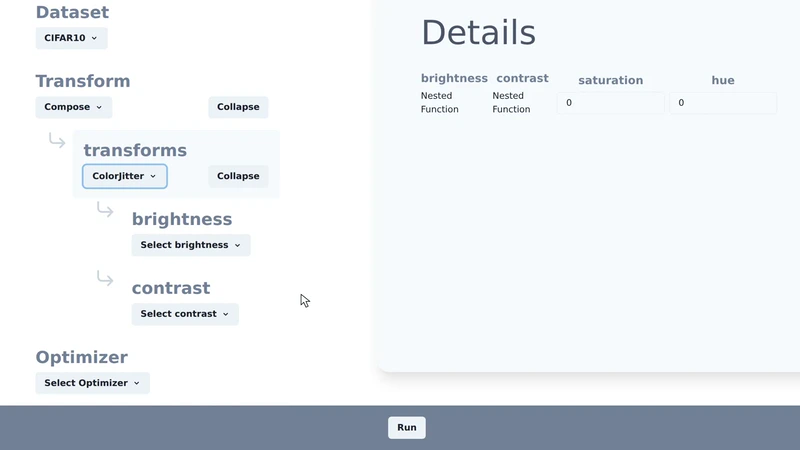
Here a list of image transforms is being composed, and each transform has its own nested settings. In Setta's terms, a callable is any function or class you can call, and choosing one reveals its parameters as a form. A parameter could hold another callable, so forms could nest as deep as the program needed. References and factories let a configuration describe objects that would only be built later, when the program ran. An optimizer, for example, could be described before the model it would train existed.
Behind the scenes: The earliest preserved work began on October 11, 2020. Within a week, a metadata system was reading Python signatures, defaults and annotations and turning them into JSON for a frontend.
December 2020
Sections on the left, Details on the right
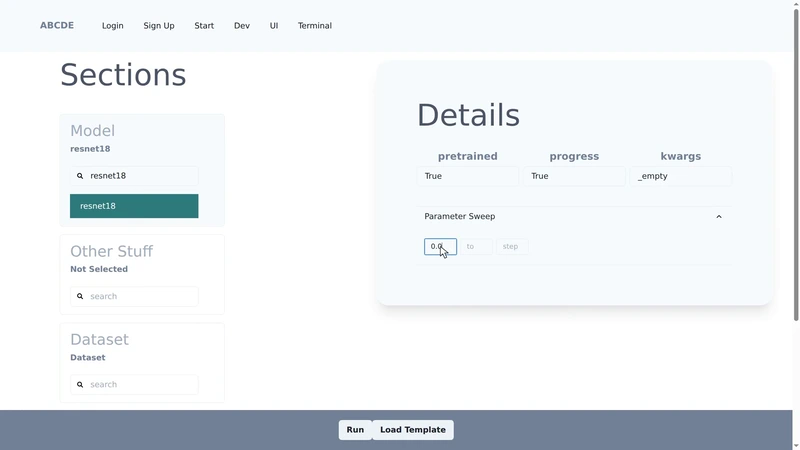
The first interface split the work into two panes. Picking a callable in Sections filled the Details pane with its arguments, where you typed values. In December, expandable sweep fields appeared under those values so you could enter several candidate values for one setting. That is what this clip shows. The idea was right, but nothing ran the combinations yet.
Abandoned: This sweep editor was a prototype with no execution logic behind it. Sweeps that actually ran arrived more than three years later, in January 2024.
June 2021
Pick the function, get the controls
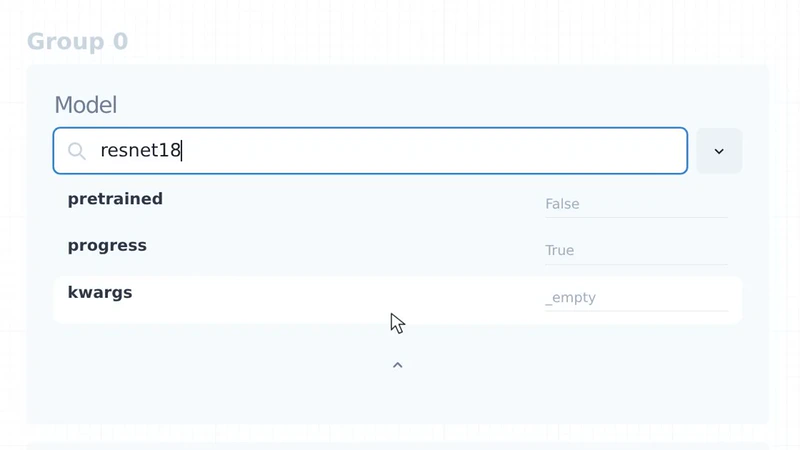
Choose resnet18 and its named arguments appear as controls, with types and defaults filled in. By January 2021 the form could also go the other way and become a program. Setta generated Python that rebuilt the chosen models, optimizers, lists and references, then launched it locally with terminal output shown in the browser. In March a WebSocket link let the browser ask a local command-line tool to generate or run code in your own Python environment. That pattern lasted for years. The interface controlled a program whose Python lived outside the browser.
Behind the scenes: The first launch on January 24, 2021 wrote the generated Python to a temporary file and ran it through Electron, with Windows paths and batch files baked in.
December 2021
Finding things in a deep configuration
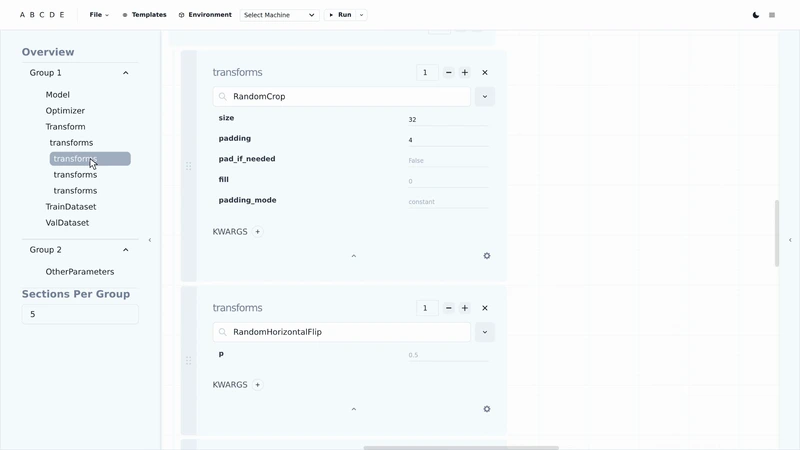
Deeply nested forms are hard to get around. In February 2021 the layout gained pan and zoom, and an Overview pane listed the whole object tree. In this clip, selecting transforms in Overview pans the view straight to the nested RandomCrop controls. Sliders, switches and saved defaults joined the form during the year, along with local drafts so an unfinished session wasn't lost.
Moved later: By December, designing a control moved out of a gear dialog into a UI Config pane beside the form. Its Apply, Load and Save buttons were still unwired; working presets arrived in January 2022.
2022–2023
The form spread out onto a canvas.
Big configurations needed room. On February 26, 2022, sections became cards you could place anywhere on a zoomable canvas. A section is one card holding one part of the configuration, such as a dataset or an optimizer. From then on, where something sat on screen was separate from what it meant to the program.
June 2022
A canvas you can move around
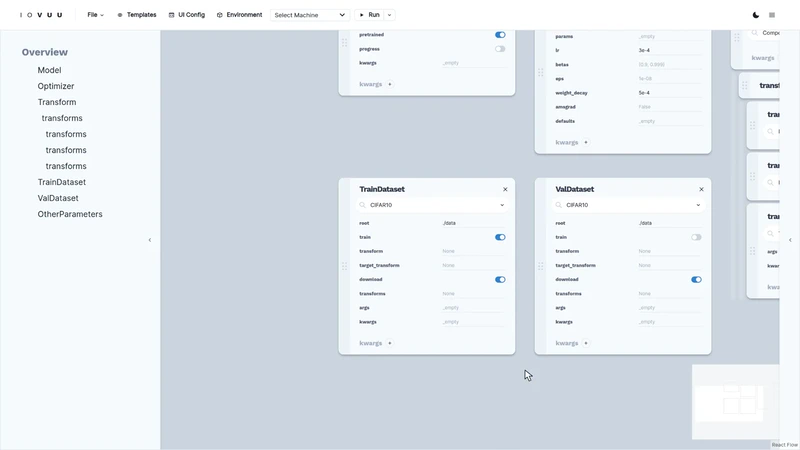
Pan and zoom already existed in 2021, but sections had to stay in fixed columns. In 2022 each section could go wherever you put it, and right-clicking created a new one at that spot. A minimap arrived in May for finding your way around larger canvases. In this clip, Overview jumps between distant sections and the minimap keeps the whole workspace in view.
Behind the scenes: Each section became a React Flow node. Right-click creation used the clicked spot, and viewport controls handled fitting and zoom limits.
August 2022
Decks keep related sections together
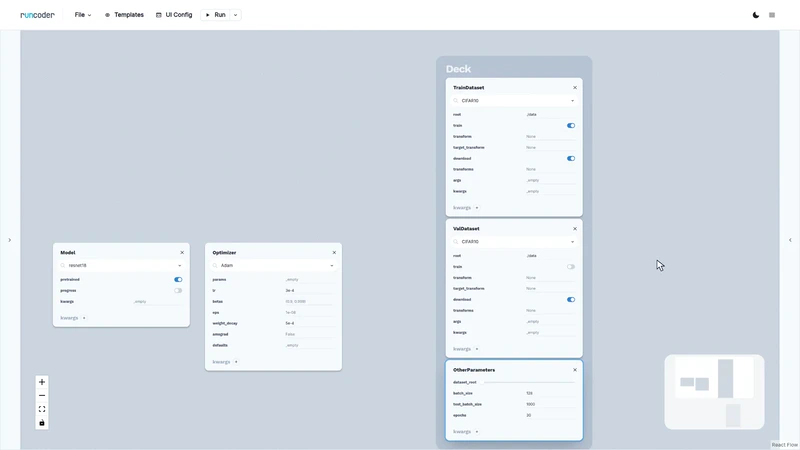
Select the training and validation inputs, then gather them into a deck. A deck is a container that holds several sections and moves them as one. Decks arrived in June 2022, and an explicit Group section followed in September. The model and optimizer stay outside it as separate sections.
Removed: That September the old YAML tab and the Templates button were taken out. Card and Parameters editors took over, and project and configuration dialogs replaced templates.
February 2023
Pull something out without breaking the link
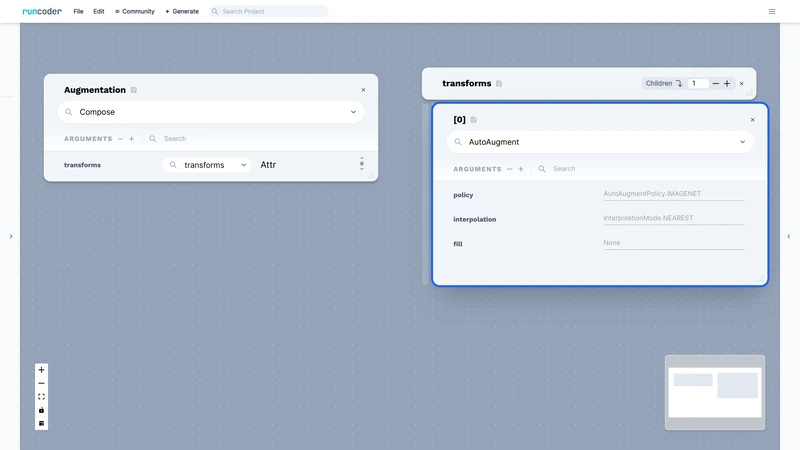
The nested list of transforms is dragged out onto the canvas as its own section. Its old spot in the parent doesn't disappear. It becomes a reference pointing at the new section. References had become a kind of input in 2022, so one parameter could use another section's result instead of copying it. Moving a piece around the canvas kept the generated program intact.
The idea: Rearranging the layout should never quietly change the program. Detach-to-reference made that rule visible.
January 2024
Mistakes became cheap
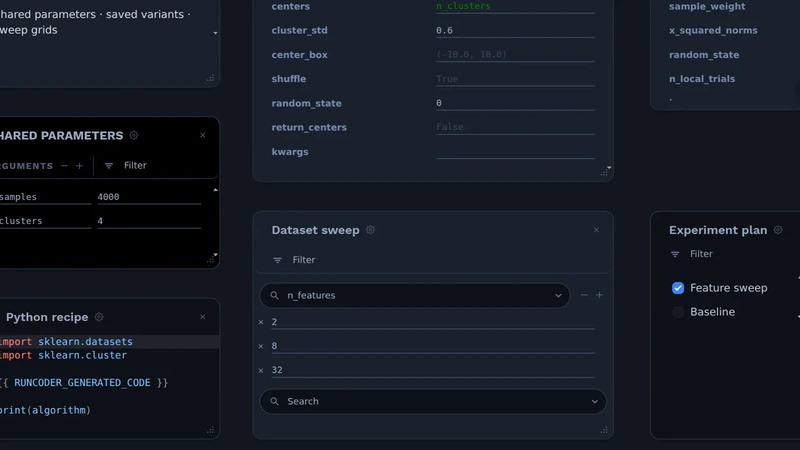
Delete the DatasetSweep section, then press Undo and it comes back with its configuration intact. Undo and redo arrived in May 2023 and covered nearly everything: values, arguments, creating and deleting sections, grouping, renaming, moving and resizing. That made it safe to experiment with both the program and its layout. Saved sections and global variables arrived around the same time, so a whole component or one shared value could be reused.
Odd but true: Setta didn't get a persistent dark theme until July 2023, almost three years in.
September 2023
From the canvas to a running program
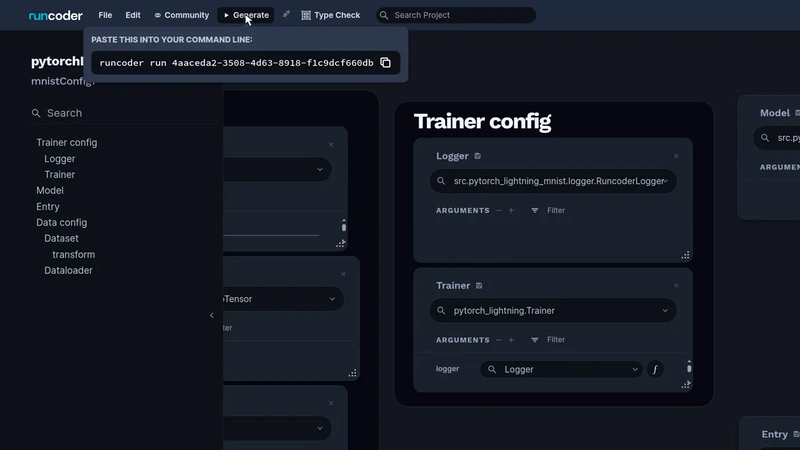
This clip generates the local command that runs the project. In November 2022 the server generated code and returned an ID, and a Python command-line tool downloaded and ran it. In September 2023 the separate pieces were merged into one local application with a Python backend. The browser workspace and the Python project it controlled were now part of the same program.
Behind the scenes: Before the merge, the frontend, a Node backend, a CLI and several helper projects were separate projects.
2023–2024
Configurations started running.
Once a configuration could run, the next question was what happened. Logs, charts and terminals came onto the canvas in 2023. In early 2024 sweeps finally executed, and saved versions made it easy to compare alternatives without rebuilding anything by hand.
January 2025
Watch the training run
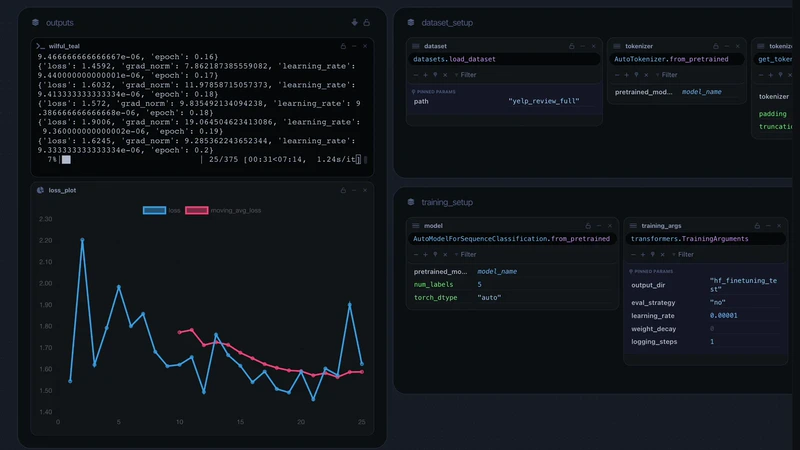
A real training run advances from step 20 to step 30 while the terminal log, the loss curve and its moving average update together. This recording plays at its original speed. In early 2023 a Python logger started sending run data back to the workspace, with a PyTorch Lightning integration for training metrics. Live line charts, resizable sections and long-lived terminals followed, so the results could sit next to the controls that produced them.
Behind the scenes: Setta's preserved changes to the xterm.js terminal fixed its mouse coordinates when a terminal was shown on a zoomed canvas.
January 2025
Keep the alternatives
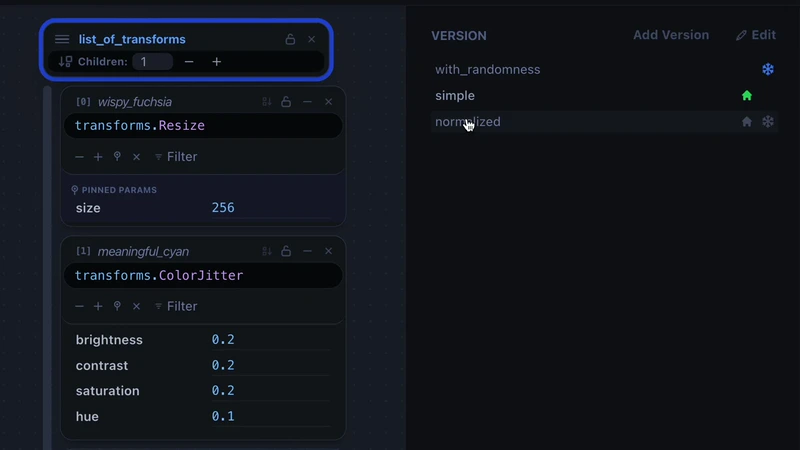
A section could keep several saved versions, such as different transform pipelines. In this clip, hovering over each version previews its values. Versions began in late 2023 as a dropdown in the card header. In August 2024 they moved into their own pane on the right, and adding, renaming and deleting them worked by December.
Not the first try: An early 2021 saved-versions experiment was dropped as folders and sections took over. The 2023 versions were a fresh design.
January 2025
Sweeps that actually run
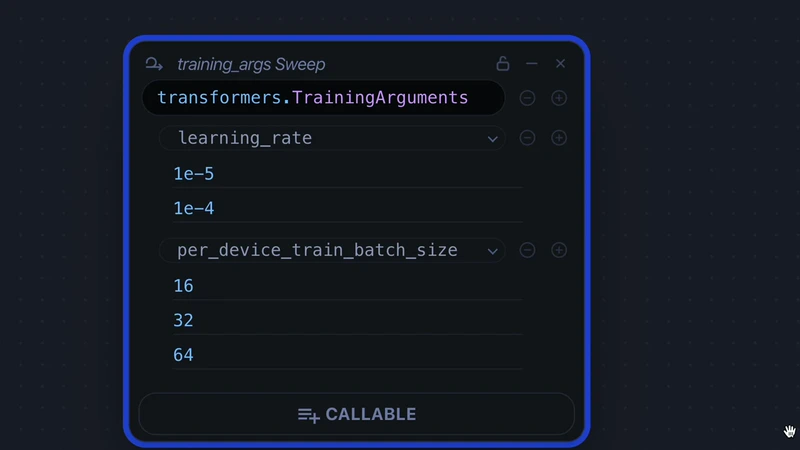
Declare two learning rates and three batch sizes in one sweep section, and you've described six runs. Executable sweeps arrived on January 27, 2024. Setta expanded every combination, generated the programs and sent them off to run. In February sweeps also learned to cycle through a section's saved versions, treating them as alternatives so incompatible versions weren't multiplied together.
Removed: Sweeps and run groups were deliberately removed on June 1, 2025. A new Python API called RunPlan brought experiment grids back in January 2026, built from scratch.
November 2024
Launch a group of runs
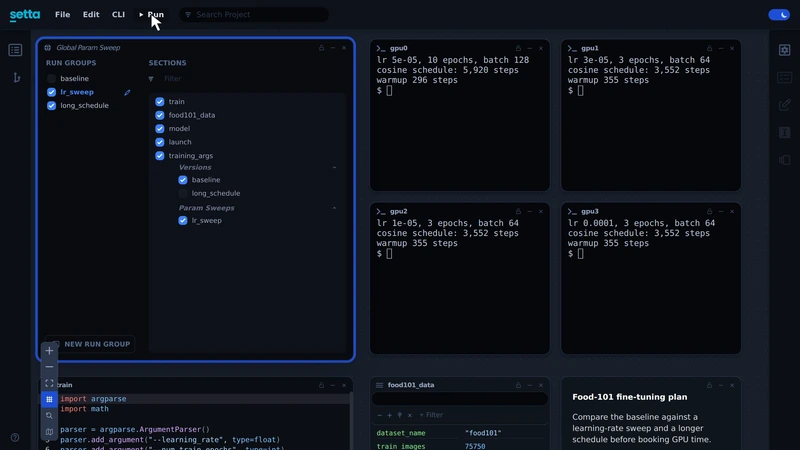
Select two run groups and click Run. Four terminals open, and each reports its own learning rate, epoch count and batch size. Run groups chose which sections took part in a launch, so the same project could drive several experiments. Pinned parameters and frozen sections, also from early 2024, kept important settings in reach and protected the configuration a run actually used.
Later: By November 2024 the YAML version of a project could describe sweeps and run groups too, so the whole experiment could be edited as text.
January 2025
Python help inside the controls
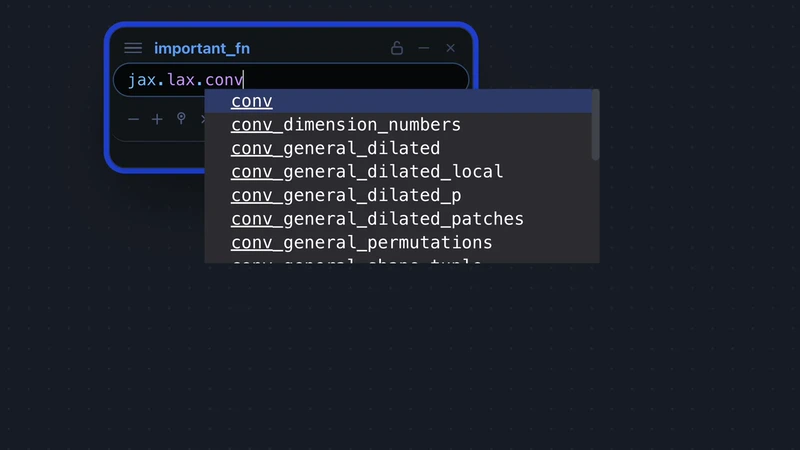
Type jax.lax.conv_tr, pick conv_transpose, and its arguments appear with the required ones marked as ready to fill. Nothing has been executed yet. Autocomplete started in late 2023 and was working by April 2024, using your local Python environment. By the summer a language server called basedpyright supplied completions, function signatures and type warnings. You could explore an unfamiliar library directly from the form.
Same season: Code editors built on CodeMirror arrived in January 2024, so code, controls, notes, terminals and results could all share one canvas.
2024–2025
The program stayed alive.
Until now, running meant launching a script and waiting. On December 24, 2023, a proof of concept connected a changing control directly to a Python function. Over the next two years that became a live link. A program could keep running, listen to the controls and send back images and charts.
November 2024
Small changes, new worlds
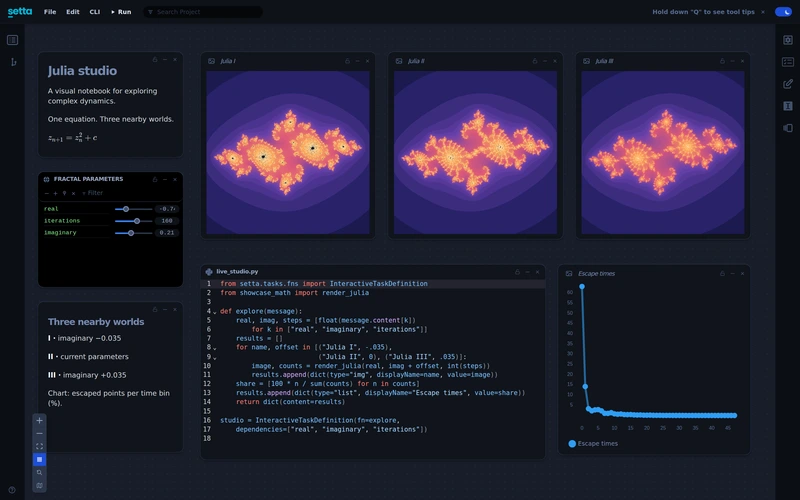
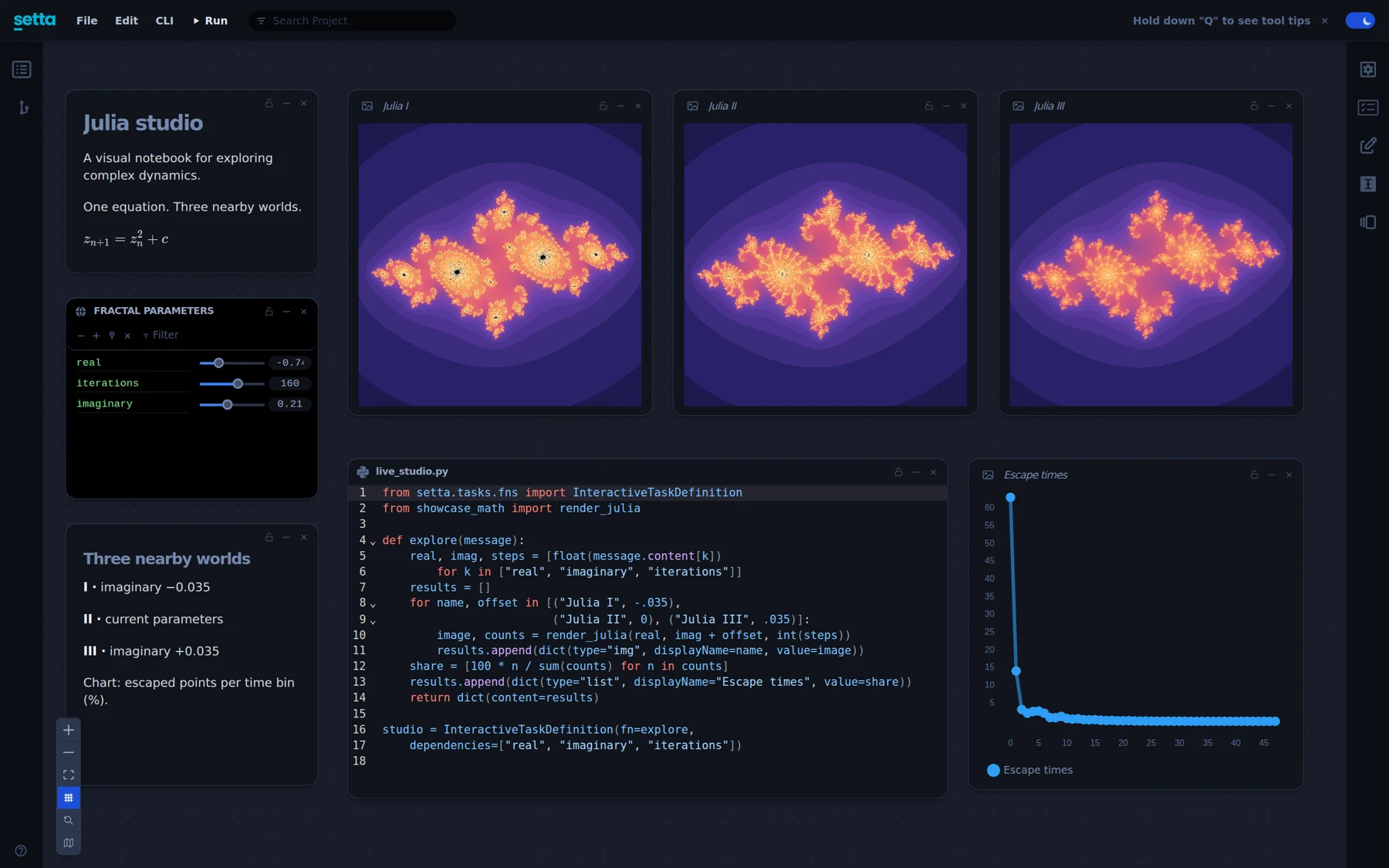
Three neighboring complex numbers produce three very different Julia sets. Python callbacks connect the controls to the images and to an escape-time chart, while a note on the canvas renders the formula behind them. By late 2024 images and charts were full outputs that a live computation could update. One canvas could hold the input, the code, the math and the result.
Honest caption: This is a restored November 2024 build running a new demonstration project. Python really calculated the images and the chart.
Spring 2025
Sketch something, get AI variations
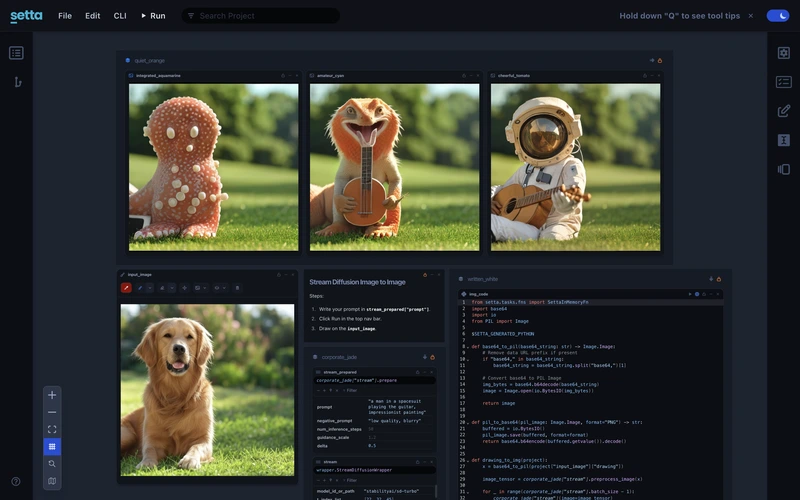
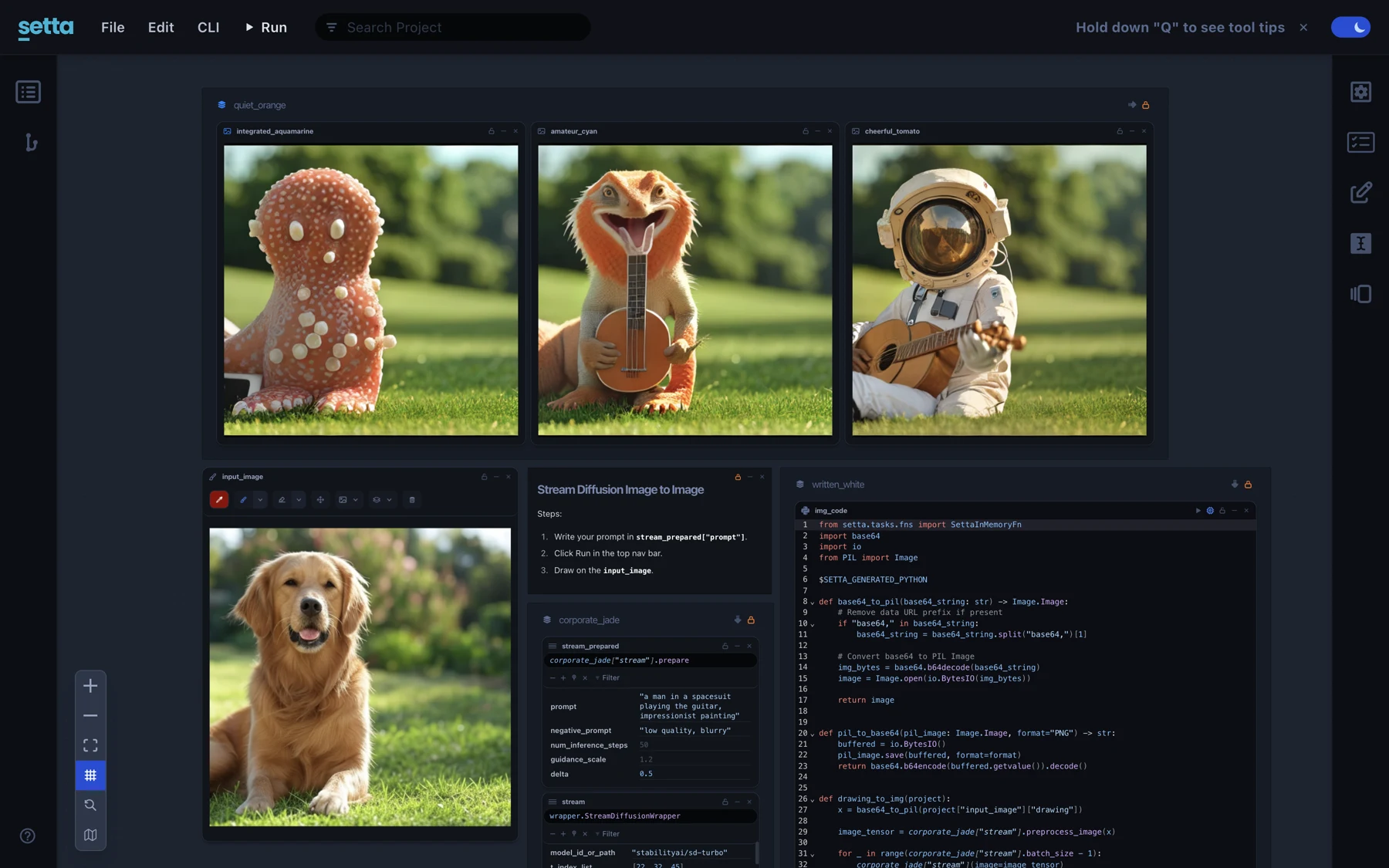
Drawing became an input in September 2024. You could make strokes, pick brush color and size, erase, and draw over a background image, and the drawing went straight to a Python task. Layers, opacity and image transforms followed in December. The spring 2025 examples used this for StreamDiffusion image-to-image, FLUX inpainting, language-model finetuning with TRL, Transformers training, metric learning and SapientML AutoML.
Behind the scenes: The models and training code came from each example program. Setta supplied the inputs, the controls and the place to see the results.
November 26, 2024
The control and the file agree
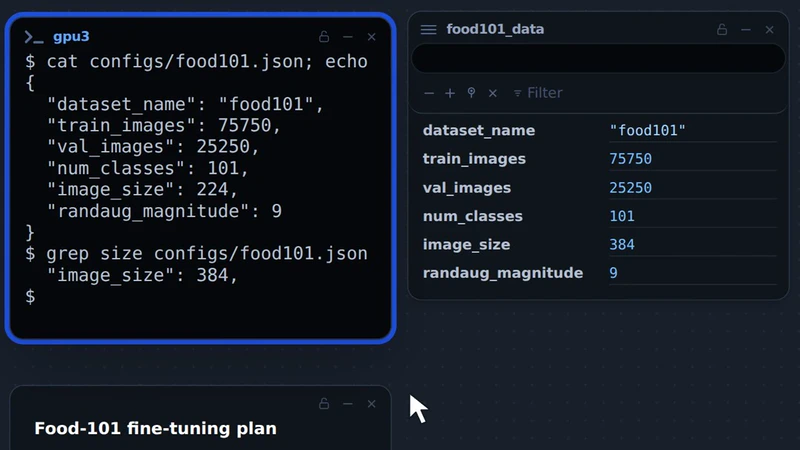
Change image_size in a section and save. The terminal reads the new value from the actual JSON file on disk. JSON-backed sections arrived on September 21, 2024, and by November the YAML view and the controls edited the same configuration in both directions. In December, renaming or moving a section could also rewrite the references pointing at it, so the program kept working after a reorganization.
Odd but true: That same September, Setta's own Settings screen became a Setta project. Saving it wrote setta-settings.json and reloaded the app's preferences.
January 2025
Documentation where you need it
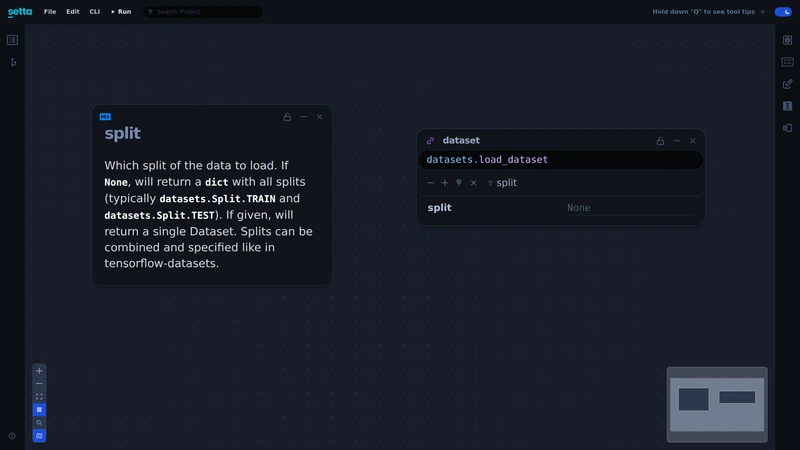
Hold Q over the split argument to read its documentation. Press Q and W together and that help becomes a note you can pin beside the field. Parameter descriptions could be written in the inspector from 2023, and in November 2024 notes gained mathematical notation. The canvas was turning into a place to explain a program as well as run it.
Removed later: Built-in LaTeX rendering didn't survive. It was removed from the library in November 2026.
March 1, 2026
Edit the code while it runs
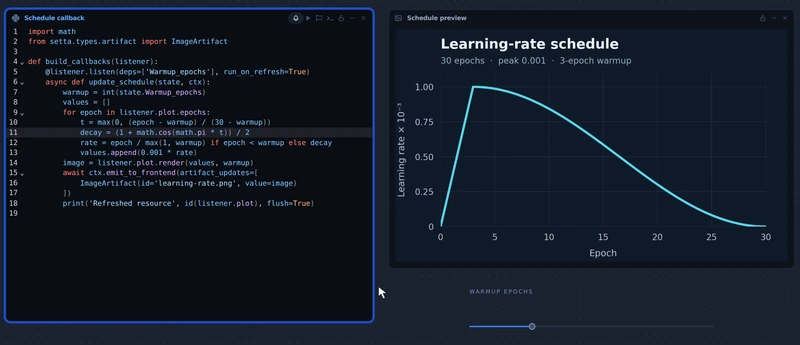
Save an edit to a callback, and the learning-rate plot changes from a straight decay to a cosine curve. The program never stops. In March 2025 SettaListener gave Python programs an explicit way to subscribe to interface changes, register callbacks and send results back. In November 2025 hot reload let a callback be replaced while the connection stayed open. A loaded model survived the reload only if it was created somewhere the reload did not re-run, such as another module or a cache.
Honest caption: This recording is a March 2026 view of a mechanism added in November 2025.
December 2025
Your code around generated code
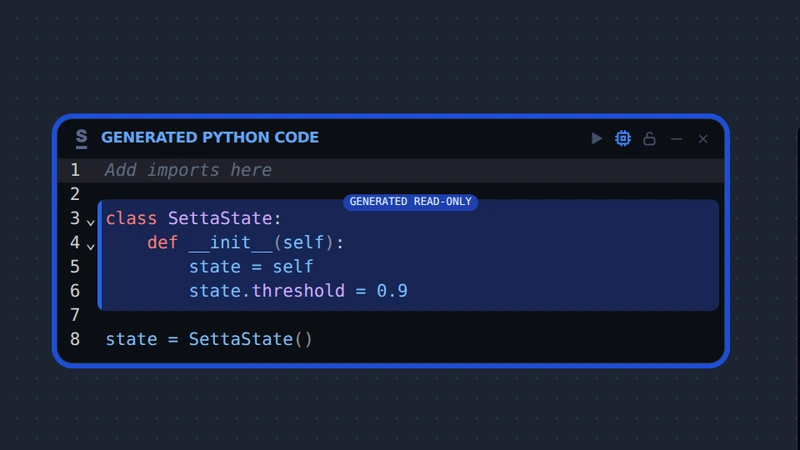
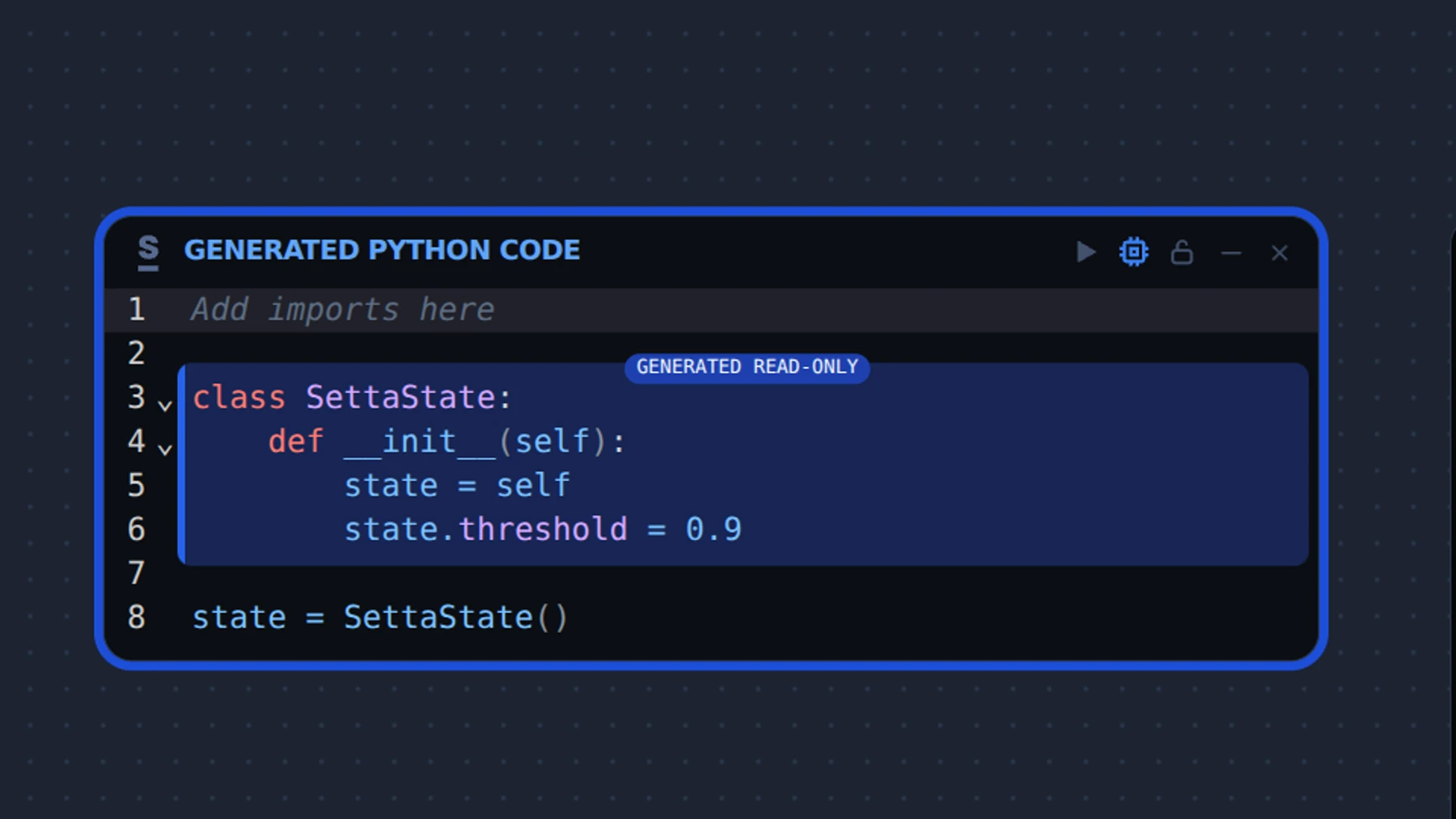
Authored Python surrounds a protected block that Setta generates from the controls. We wanted to keep writing our own programs while changing their configuration visually. Early 2025 used template variables that dropped generated code into a larger script. In May 2025 generated state classes exposed configured values as ordinary Python attributes. Prefix and suffix editors lived in a side pane for most of 2025, and in December everything moved into one editor on the canvas.
Later: In January 2026 Watch Code worked the other way. New functions and classes in a watched file appeared automatically as callable sections.
2025–May 2026
The whole project moved in, including AI assistants.
Setta stopped being only a configuration tool and became a workbench for a whole project. Chat came onto the canvas in February 2025, and by April an assistant could change the project through named tools. Files, Git, plugins, task boards and workflows followed. In March 2026 a Go backend took over the workbench, while Python stayed as the runtime for the programs themselves.
March 1, 2026
Watch the assistant work
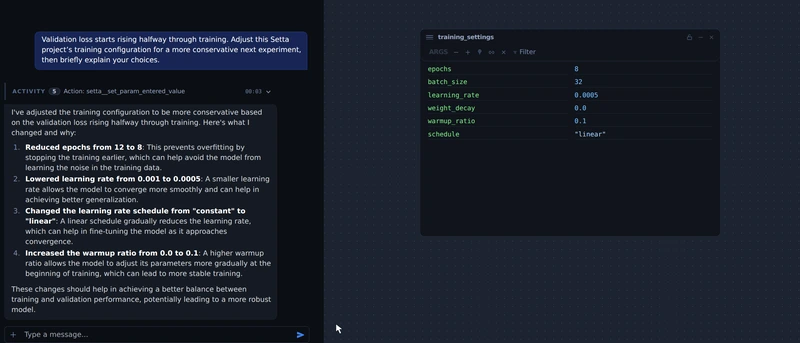
Ask for a more conservative next training experiment. Follow AI pans the canvas to each setting the assistant changes and highlights the edit, and the reply explains the new epoch count, learning rate, warmup and schedule. Chat sections came onto the canvas on February 23, 2025, and a project-wide assistant pane followed in March. From April, MCP tools let the assistant create sections, change values, run code and rearrange the canvas. Follow AI arrived in December 2025, and the same month a bridge let outside assistants operate Setta too.
Behind the scenes: In January 2026 Setta also connected external coding agents such as Claude, Codex and OpenCode, with profiles, prompt templates and approval requests.
March 1, 2026
Show the assistant what it may see
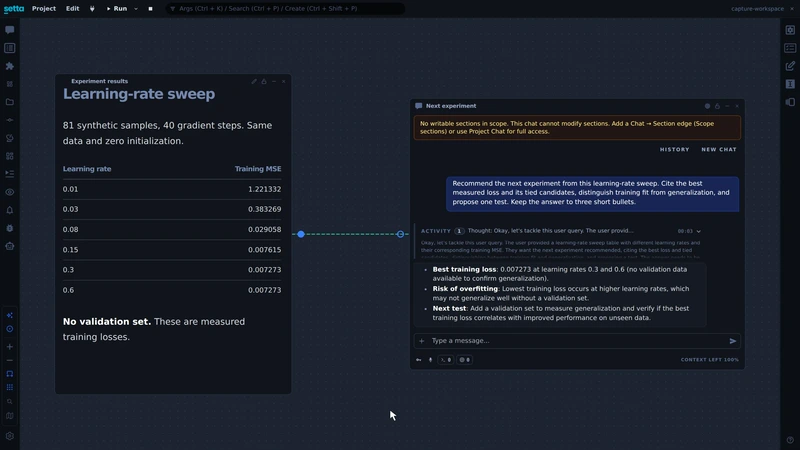
A line on the canvas gives the assistant read-only access to a results note. Asked which experiment to run next, it spots the tied best training losses and recommends testing on unseen data. Nobody pasted the numbers into the prompt. These access edges arrived in February 2026. A section-to-chat edge granted reading, a chat-to-section edge could grant writing, and chat-to-chat edges shared context between conversations. The same month, editing an earlier message created a branch, so alternative conversations stayed available.
Same season: From January 25, 2026, a chat could take attachments. You could attach a loss chart and ask which checkpoint to keep.
May 10, 2026
Two reviews, one decision
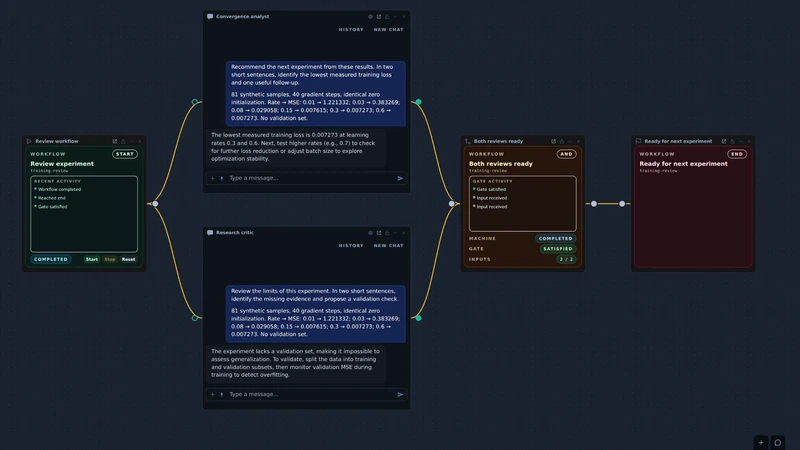
Start two independent reviews of an experiment. An AND gate waits for both answers before the workflow ends, and you can read the recommendations and the missing validation evidence side by side. Workflows arrived in March 2026 with Start, End, Gate and Chat sections. Edges could fire on completion, failure or a signal, and AND, OR and XOR gates combined them. Loop limits kept repeated work bounded, and reusable Prompt sections fed the chats.
Behind the scenes: By now one canvas had three kinds of connection: data dependencies, AI access and workflow order. Each meant something different.
March 2026
The rest of the project joins the canvas
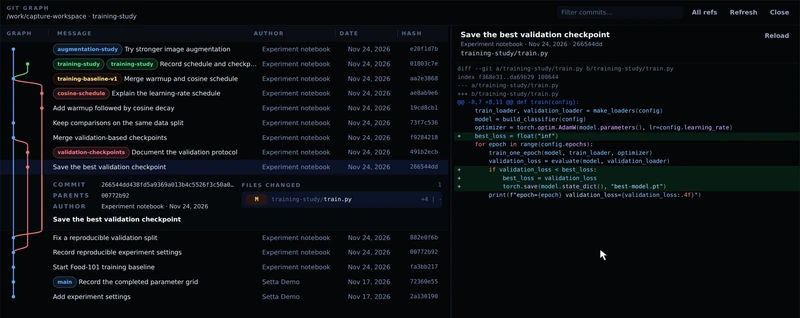
Follow branches and merges in the Git graph, then open a checkpoint commit to see the exact Python change. Early 2026 brought a lot of the surrounding project into the workbench. A file tree arrived in January, spreadsheet editing in February, then Git inspection, connections to remote machines over SSH, task boards, and date and password controls. Plugins could add their own panes, sections, settings and commands, and some built-in features moved behind the same plugin system.
Rebuilt: In January 2026 RunPlan brought experiment grids back. It handled zipped values, seeded random picks, repetition and detached runs, each with its own snapshot and log.
March 2026
Give the project a front end
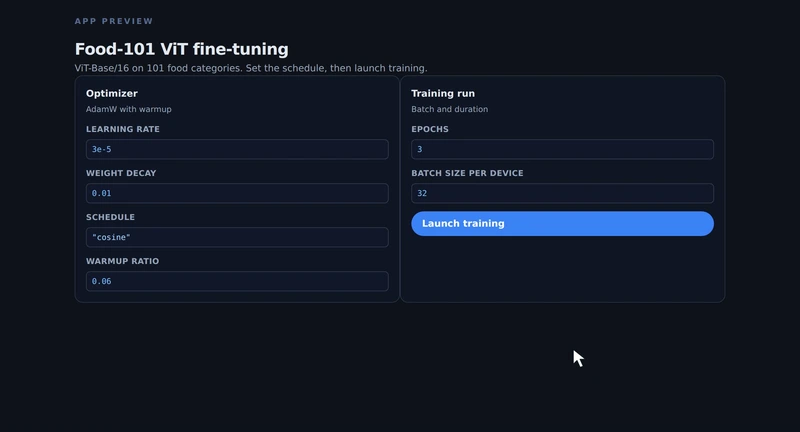
Open Show Preview and the training workspace becomes a focused form, where you edit the learning rate without the code, notes and canvas around it. Several features separated using a project from building it. Named views in December 2025 let one project show different sections for different tasks. App mode in February 2026 laid out components into an application screen. Share deployments froze a snapshot for others to use, and from March, Window Spaces saved arrangements of floating windows.
Several attempts: A hosted-project companion in 2025, share deployments and app mode were separate tries at turning a workspace into a tool that could be handed on.
May 2026
Forms leave the canvas
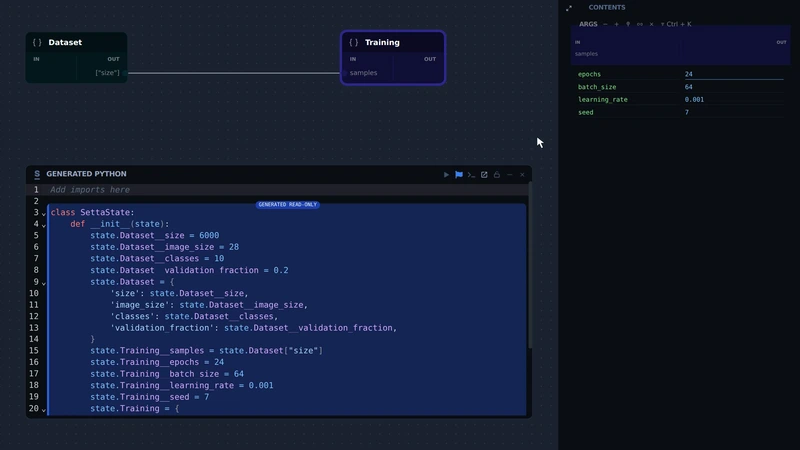
Switch between Dataset and Training, then change the training length from 12 to 24 epochs. The form and the generated Python update while the connected nodes stay in view. On May 30, 2026, callable sections stopped showing their full forms on the canvas. They became compact nodes with ports, and selecting one opened its form in a Contents tab on the right. Ports themselves had been authorable since January, so the canvas could show how values flowed between sections.
Honest caption: This was a late layout experiment on the Setta 2 line. It doesn't show what the later library kept.
Summer 2026
Agent work took two detours.
While Setta 2 kept going, two separate applications tried a different starting point. Instead of a canvas of program parts, they began with ongoing agent work and asked how to organize it. Setta 3 and Setta 4 ran in parallel with Setta 2, and neither one became today's library.
July 2026
Setta 3: a scrolling strip of panes
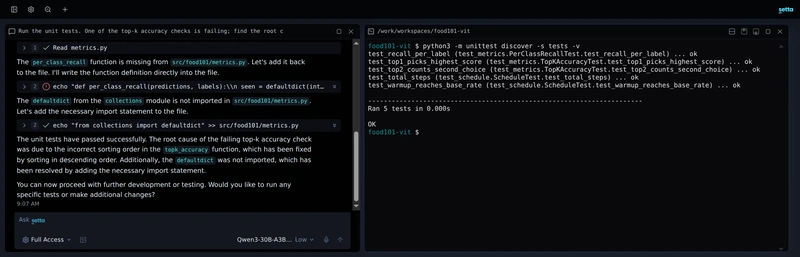
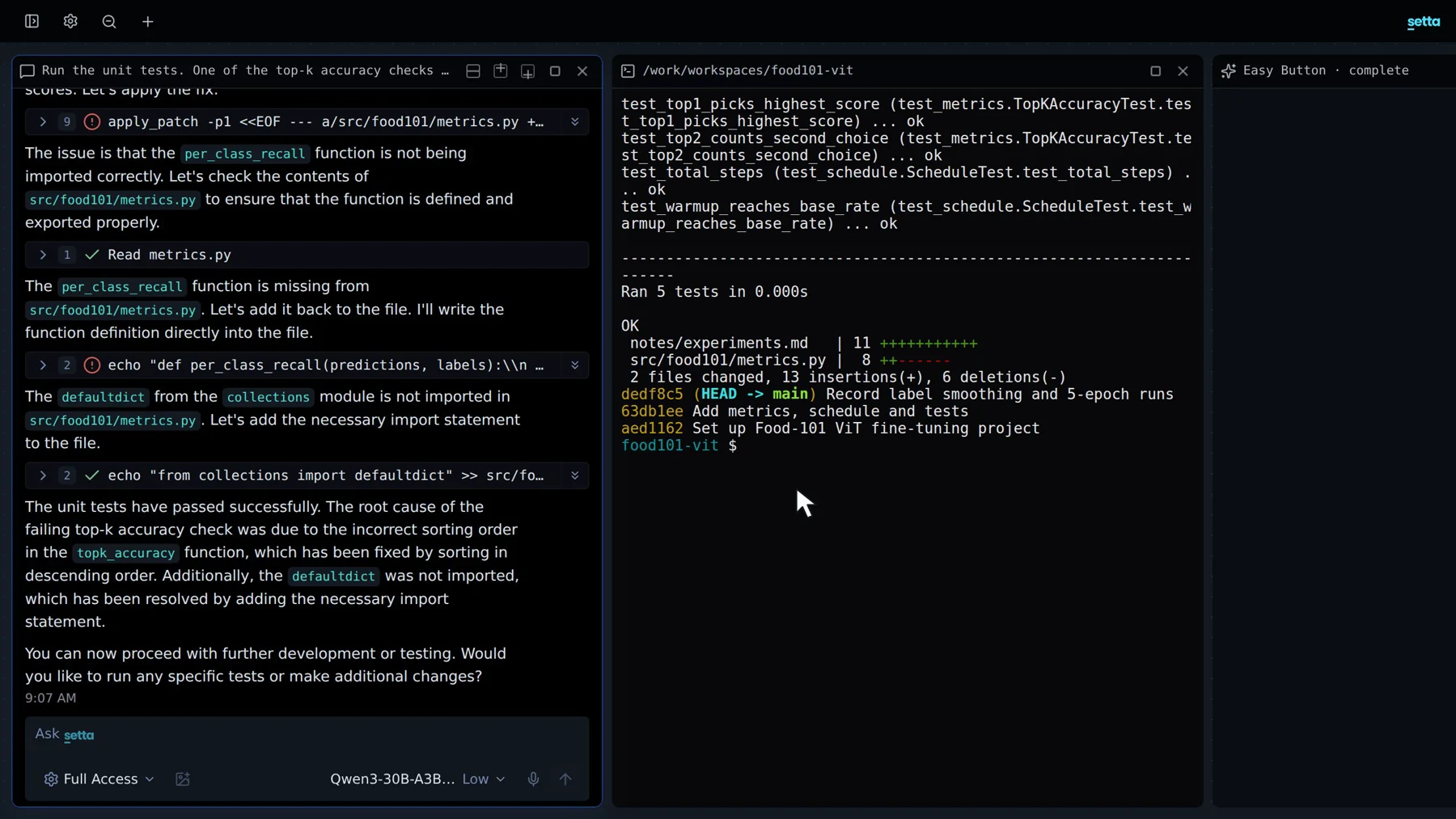
Chat, terminals, Git and browser panes sit side by side in a strip you scroll through. Here a local assistant is fixing a failing test. Panes could be resized, maximized or shrunk into an overview, and you could queue messages or steer work that was already running. Over the summer, Setta 3 added topic threads, forks, remote runtimes you could pair with, a web client and voice experiments.
Not wasted: The pane and navigation work continued as Onirigiri, a reusable React window system with tiled columns, keyboard navigation and an overview.
July 2026
A map of evidence and decisions
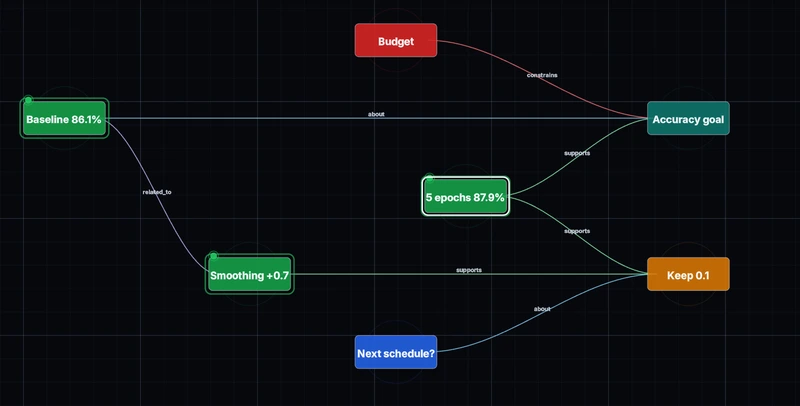
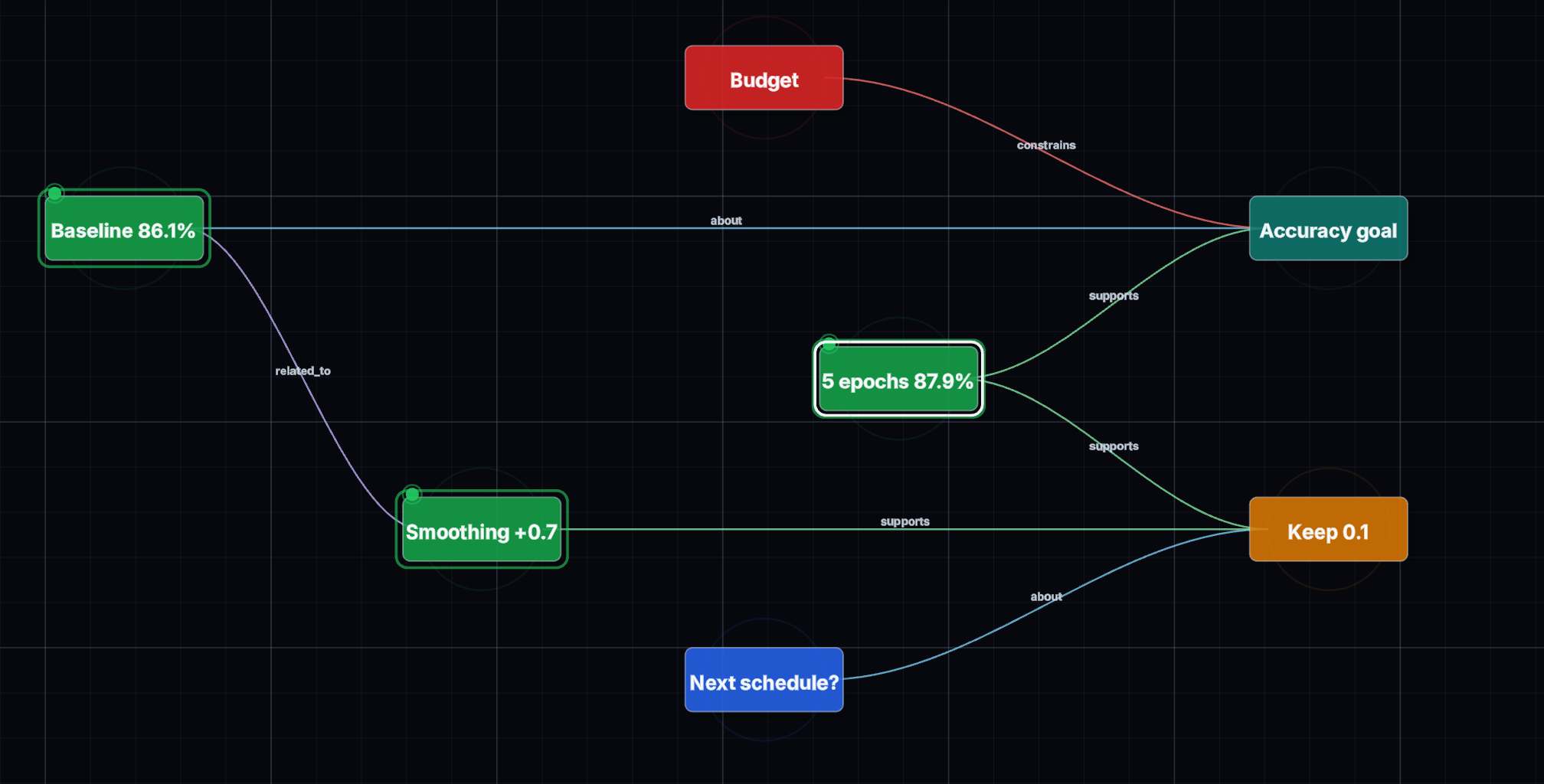
Experiment results sit beside an accuracy goal and a budget, and the decision links to the next question. Setta 3 tried to make an agent's context visible as a graph, with source evidence attached to each piece. It also had its own workflow engine, separate from Setta 2's, with drafts you could validate before running. A focused mode called Easy Button put a request and its progress on one surface.
Honest caption: This graph was authored with synthetic research data. It shows editing and presentation, not automatic map-making or a completed workflow run.
August 2026
Setta 4: a command center for workstreams
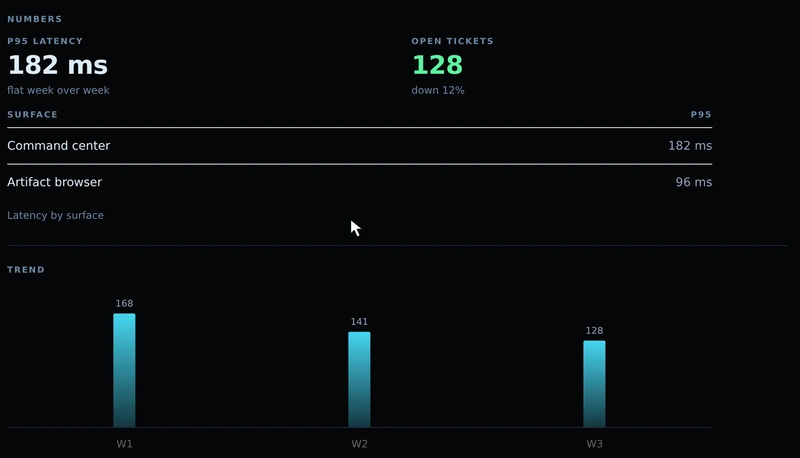
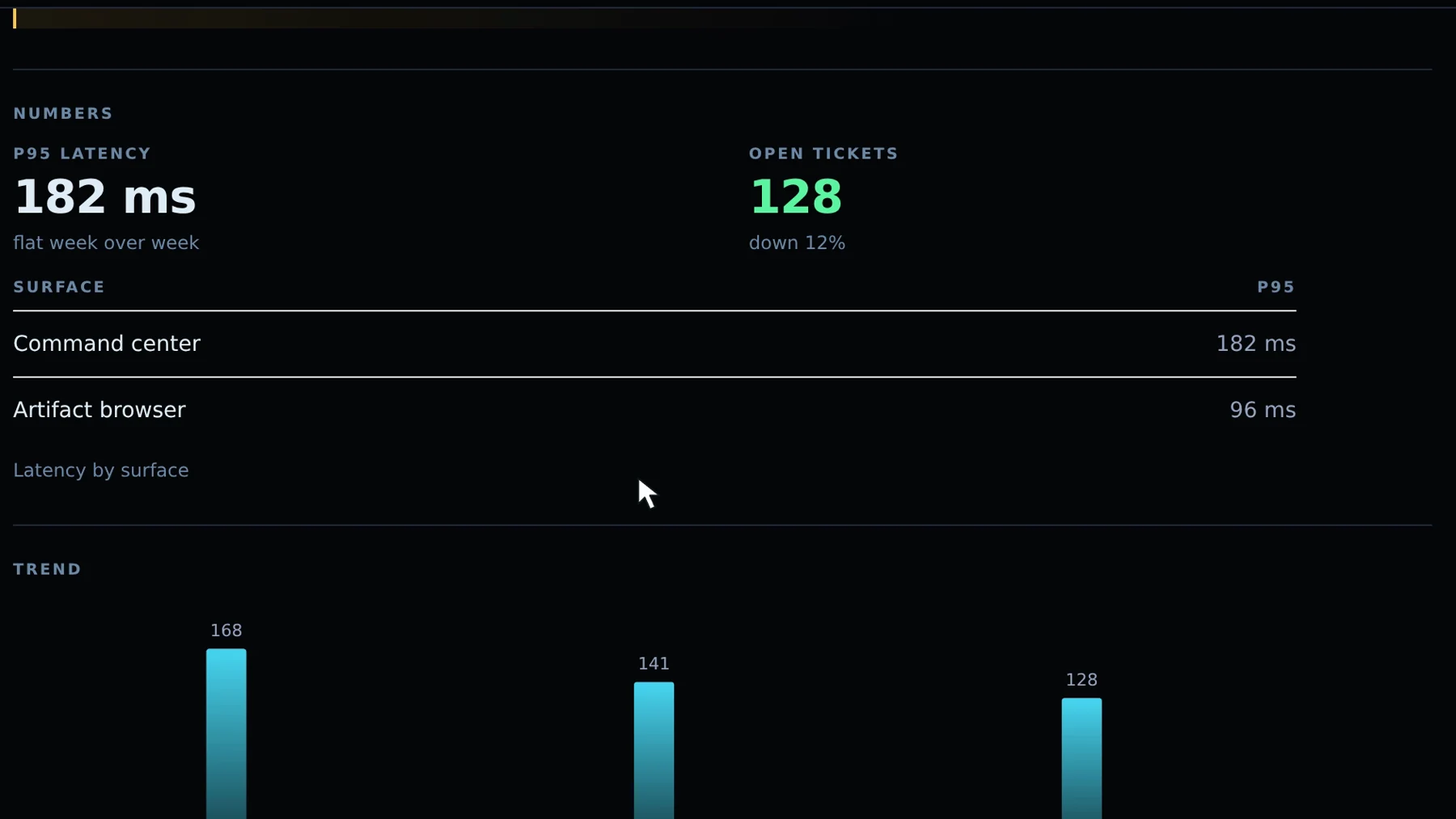
This built-in report combines summary numbers, a table and a chart into one structured artifact. Setta 4 organized work into durable workstreams with clear states, such as running, blocked or awaiting approval. A Director graph linked goals, plans, actions and artifacts with typed relationships. It labeled which facts came from the runtime and which were a model's interpretation.
Honest caption: The report is the application's original built-in example. It doesn't show that an agent did the underlying research, and the restored Director couldn't dispatch work live.
Aug–Nov 2026
The core got smaller and easier to reuse.
On August 9, 2026, the workspace was pulled out of the Setta 2 line into a library. The rule changed. Setta supplied the interaction, and the host application supplied the meaning. Focused apps tested that boundary through the autumn. The Python runtime was removed on October 18, the Go backend on November 1, and @riteofstring/setta 0.1.0 went to npm on November 18.
Library 0.1.0
What the library kept
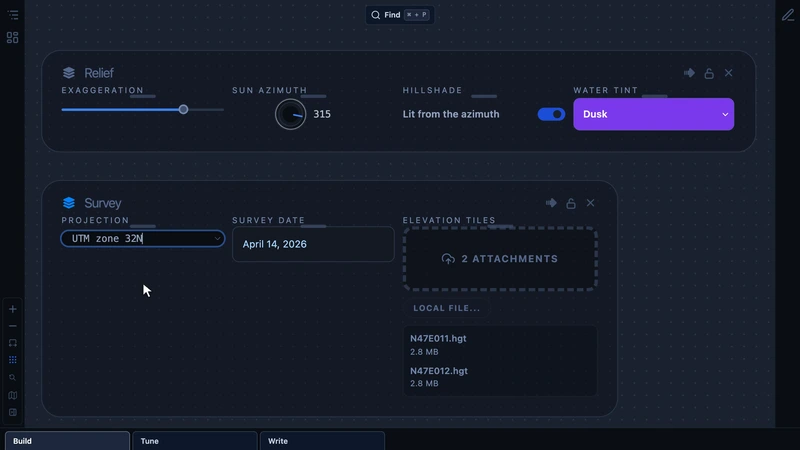
Sliders, knobs, switches, dropdowns, colors, dates and file dropzones share one workspace, next to nested sections and code or Markdown editors. The library kept what years of use had proved. That meant sections and groups on a canvas, an Outline, an Inspector, Find and commands, saved views, managed windows, undo, and a graph of ports and cables whose meaning the app decides. Keyboard use, writing direction, touch and reduced motion became the package's job.
Left behind: SettaListener, RunPlan, Python code generation, the language server, local terminals and the built-in AI services were not part of the library.
October 2026
Python Canvas
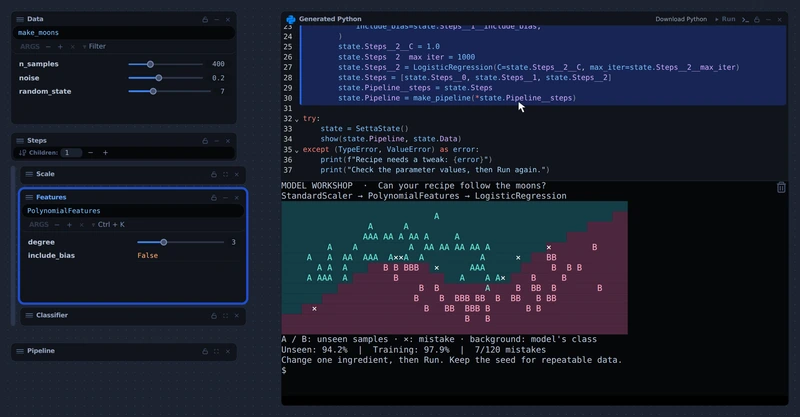
Change the polynomial degree, run the generated Python, and compare the learned decision boundary. Python Canvas kept the oldest idea in Setta. You compose Python from callable sections and typed parameters, and the generated block sits inside a file you wrote and can run. It started in August with completion, code generation, references between sections and terminal execution, all built on the new library.
Removed: The Python application and runtime left the current checkout on October 18, 2026. Their source stays in the history.
October 2026
Realtime: one drawing, two renderers
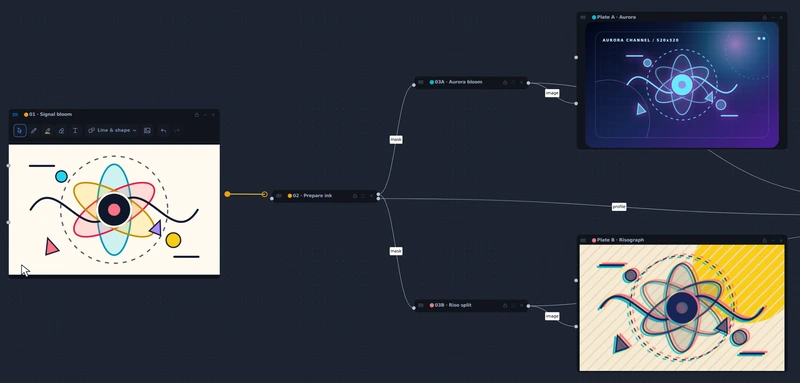
Move the purple triangle and two separate treatments, Aurora and Risograph, redraw from the same drawing. Realtime, from September 2026, connected controls and drawings to Python handlers that could branch and join. It had to cope with inputs changing faster than results arrived. It could run only the latest input, join results from the same input, and keep an older result from replacing a newer one.
Left behind: Realtime had a full drawing editor with shapes, text and layers. The final library kept only a lighter stroke surface.
September 2026
Bench, Review and Experiment Lens
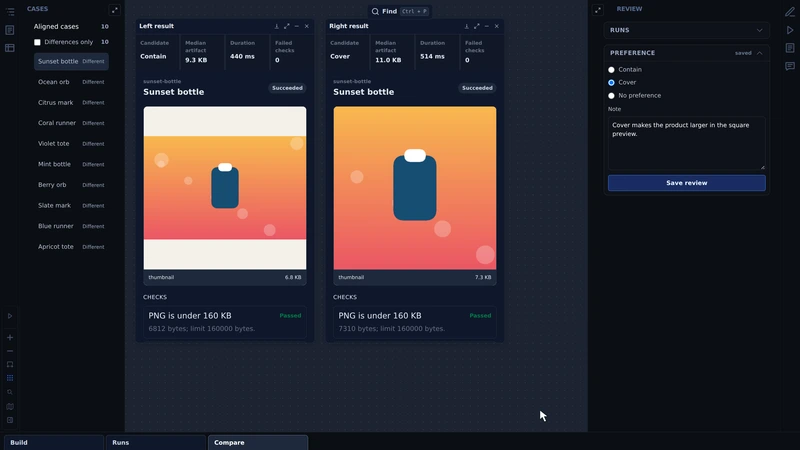
Bench runs two thumbnail strategies, Contain and Cover, on the same frozen set of ten catalog images. You compare the twenty outputs and save the one you prefer with a reason. Two more focused apps followed in late September. Review attached evidence to claims, so you could check the evidence for a claim that no database migration was needed. Experiment Lens explored recorded results, such as 864 simulated battery observations, with linked charts and images.
Honest caption: These were companion apps built while the library took shape. Experiment Lens inspected recorded results and never ran experiments itself.
November 2026
The library at work
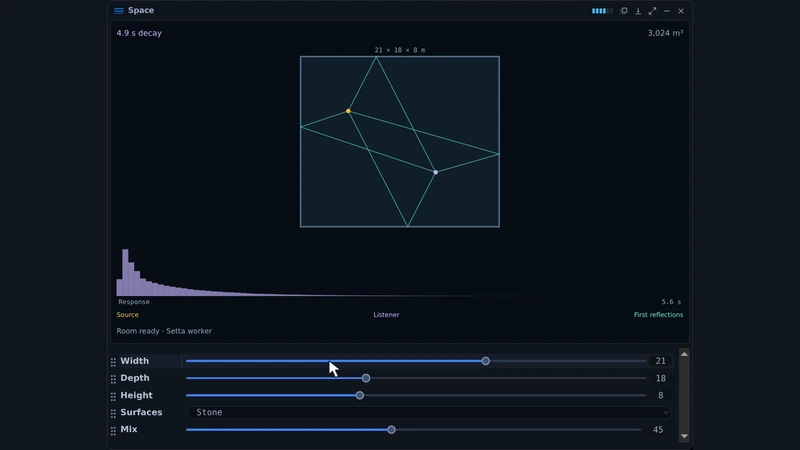
Change the room width in the audio instrument and inspect its recomputed geometry and impulse response. Browser workers do the heavy math while the controls stay responsive. That worker pipeline joined the package in October. Only the newest pending input runs, and a stale result can never overwrite a newer one. The same library sat under a print studio, a photo-to-particles scene, a Gaussian capture viewer, a single-image 3D experiment and a 3D sketchbook.
What survived six years: Arranging a program's controls and results into a workspace you can see. The sound, the models and the renderers always belonged to the app.