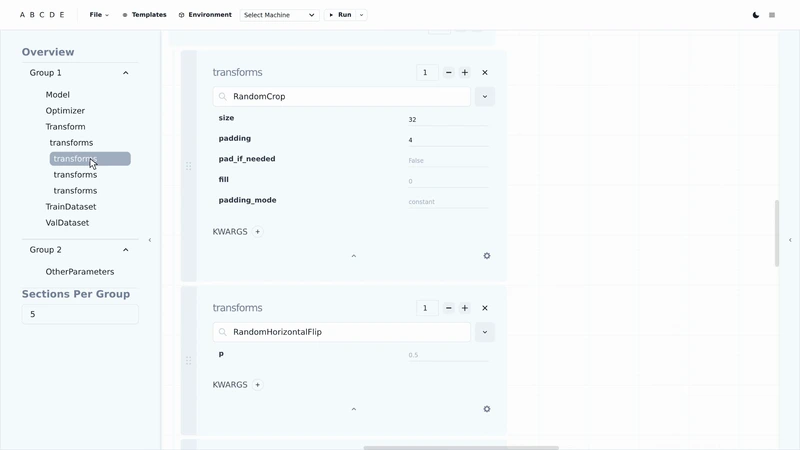
Python's inspect module described functions and classes, and a React page drew controls from that description without building the objects themselves. A Django web backend stored the work, while a separate Electron desktop experiment wrote generated Python to a file and launched it on the local machine. Training configuration for PyTorch was the first problem, but the description machinery was general.
Interface
JavaScript and React (Create React App), Chakra UI, Emotion, Easy Peasy state, Monaco in the developer pane
Python runtime
inspect-based ClassInfo metadata; an environment with PyTorch, torchvision and CUDA
Server
Django, Django REST Framework and Knox tokens; a June 2021 Graphene-Django GraphQL branch
Storage
SQLite behind Django
Packaging
Electron desktop experiment with node-pty and electron-builder
2021
How does a web page run Python on your own computer?
What was hard
A browser page cannot start processes on your machine. Setta generated Python from the form, but something still had to run it next to the GPU and files on your machine.
The obvious approach
Putting everything in one web server would mix three jobs: generating configuration, serving a web API and executing user code. Each of those has different security and lifetime needs.
What Setta did
The early design paired a web backend with a local execution bridge. Django with Django REST Framework, Knox tokens and SQLite served the web API. An Electron desktop project bridged to the local machine: January 2021 code wrote the generated Python to a file and launched it through Node's process APIs, with node-pty and electron-builder in the desktop package.
Later: A June 2021 Graphene-Django branch explored GraphQL, but it was an experiment, not the backend of every later version.
How do you zoom around a form before there is a canvas?
What was hard
In 2021 the contents were still one large structured form, but deep configurations needed pan and zoom. The scrollbars, the visible form and navigation all had to agree as the view moved.
The obvious approach
Wrapping the form in a CSS scale transform makes it look zoomed. The browser's scrollbars and the page's bounds still think in unscaled sizes, so scrolling and jumping to a section land in the wrong place.
What Setta did
Setta wrapped react-map-interaction and measured the form with react-sizeme. It kept scale and translation together, using coordinate transforms to keep the horizontal and vertical scrollbars aligned with the view. Bounds came from the scaled content, the viewport and margins. By March, navigation also accounted for the Overview pane's width and used Framer Motion for positioning.
Later: React Flow replaced this custom layer in 2022, when sections got their own positions.
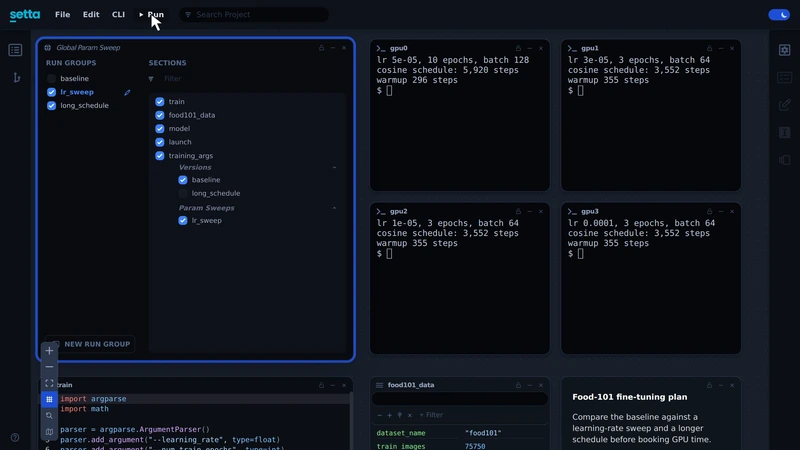
React Flow turned the form into a canvas of independently placed sections, and dnd-kit handled moving pieces around inside it. The frontend changed in stages: Vite, Radix UI and Tailwind, then Zustand, with TypeScript growing alongside the existing JavaScript. On the server side the archive shows a run of separate experiments before an Express line stuck.
Interface
React Flow (first as react-flow-renderer), dnd-kit, Vite from Oct 2022, Radix UI and Tailwind, Zustand from Dec 2022, gradual TypeScript
Server
NestJS, AdonisJS, MikroORM and a brief Koa experiment, then Express with Prisma, Passport, sessions and WebSockets
Storage
PostgreSQL in one 2022 experiment; the retained Prisma schema selected SQLite
Python runtime
a separate Python CLI with Click, requests, keyring, PyYAML and websockets, plus Jedi and mypy for code analysis
2022–2023
Why did the server stack change so often?
What was hard
Once configuration became spatial, the backend needed accounts, project records and live connections. It was not obvious which TypeScript server framework fit.
The obvious approach
Reading the commits as a single release sequence makes it look like one product upgraded its entire server stack every month.
What Setta did
Several entries were alternative experiments. The archive holds NestJS in August 2022, AdonisJS and MikroORM with PostgreSQL in September, a brief Koa server on December 17 and Express on December 18. The Express line lasted: by September 2023 it used Prisma, Passport, sessions and WebSockets, and its Prisma schema chose SQLite. A separate Python CLI used Click, keyring and websockets, with Jedi and mypy for code analysis.
Later: In October 2023 the split backend gave way to one local Python application.
Why would resizing a panel or clicking in a terminal go wrong on a zoomed canvas?
What was hard
re-resizable resizes elements, and xterm.js draws terminals. Both measure the mouse in screen pixels. On a canvas zoomed to 50%, one screen pixel is two canvas units.
The obvious approach
Dropping the stock components onto the canvas makes them look correctly zoomed. A resize handle then moves at the wrong speed, and a terminal can select or point at the wrong character, because their input math still assumes 100%.
What Setta did
Setta's resize wrapper captures React Flow's zoom at gesture start and passes it to re-resizable as scale, so the handle follows the pointer. This coordinate conversion also mattered inside terminals: a January 2024 xterm.js fork adjusted mouse coordinates for canvas scale.
Later: The scale-aware resize wrapper is still how the library handles resizing at zoom.
Why does a dnd-kit drag fall behind the pointer on a zoomed canvas?
This puzzle has a hands-on demo that needs JavaScript.
What was hard
React Flow moves whole sections around its canvas and handles zoom itself. Setta also needed drags React Flow does not provide: reordering a parameter, moving it into a group or pulling it out onto the canvas. Those used dnd-kit inside React Flow, and dnd-kit reports movement in screen pixels while the canvas works in its own zoomed units.
The obvious approach
The obvious approach adds dnd-kit's screen movement straight to the card's position. At 50% zoom the canvas then draws that movement at half size, so the card falls behind the pointer, and collision thresholds measured in pixels are off by the same factor.
What Setta did
Setta adapted its dnd-kit fork to the workspace's nesting rules. Screen movement is divided by React Flow's zoom before it moves nested content: 40 screen pixels at 50% zoom becomes 80 canvas units, which the canvas draws as 40 pixels again. Screen points use the corresponding coordinate transform: subtract the canvas's screen origin and viewport pan, then divide by zoom, with grid snapping when enabled. Collision thresholds also respect scale.
Later: The current library still uses dnd-kit with a local zoom adapter for this conversion.
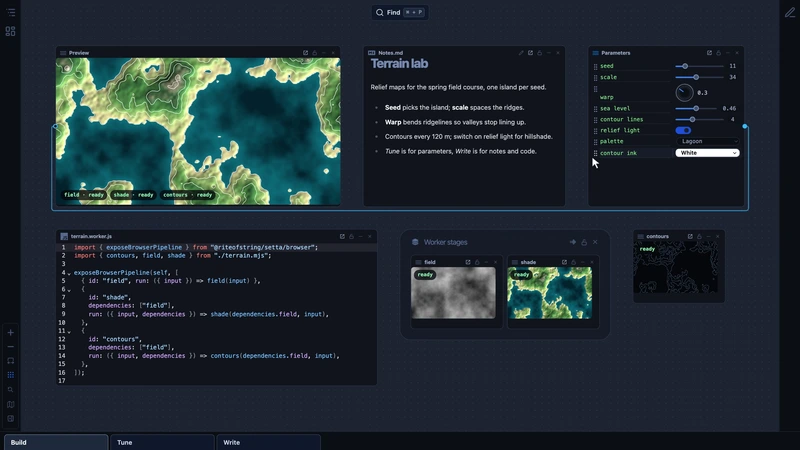
In October 2023 the frontend and a Python runtime came together in one local application. FastAPI served HTTP and WebSocket endpoints, and Python handled configuration, generated programs and local computation. The browser gained editors, terminals, charts and mathematics; Python supplied local execution and language analysis.
Interface
React, Vite, React Flow, CodeMirror 6 from Jan 2024, xterm.js, visx then Chart.js from Dec 2024, react-markdown, remark/rehype, KaTeX
SQLAlchemy over a local SQLite database, with periodic backups from Sept 2024
Packaging
small preserved forks of xterm.js and xyflow for the zoomable workspace
2023–2025
How do you tidy a messy canvas with one click?
What was hard
Sections come in many sizes, and after a while the canvas becomes a pile. We wanted an automatic arrangement that kept panels from overlapping.
The obvious approach
A graph layout that follows connections would try to infer meaning or execution order from the edges. That is a much harder problem than the one we had, which was simply panels of different sizes that needed to fit together.
What Setta did
In February 2023, Setta added potpack to handle rectangle packing. It collected the measured React Flow rectangles, added a 50 pixel margin, packed them and placed the result relative to the canvas's existing minimum coordinates. In December 2025 the work moved to Python with rectangle-packer, imported as rpack. Its adapter validated and rounded padded sizes and converted lower-left coordinates to the canvas's top-left ones.
Later: The current library has its own layout planner, which treats locked sections as fixed obstacles. potpack is history, not a current dependency.
Why is undo hard when one click changes five things?
This puzzle has a hands-on demo that needs JavaScript.
What was hard
Setta kept its state in several Zustand stores. A single edit could change parameters, sections, code information, control types and project configuration at once, in different stores.
The obvious approach
Giving each store its own undo history and rewinding them separately looks clean. Undo would then restore a section in one store while its parameters or layout stayed changed in another, leaving a broken project.
What Setta did
Setta grouped related changes into one undo step. From April 2023, zundo supplied history for Zustand stores, usually wrapped around Immer; a shared version number tied their snapshots together. Around each change Setta resumed recording, saved the related store states under that version, then paused again. Undo and redo moved every store belonging to that version together.
Later: zundo was removed in August 2025 as state ownership changed. The library's structural history is a new design where each completed gesture is one history entry, owned locally or by the host.
If CodeMirror is the editor, what makes autocomplete and errors work?
What was hard
The workbench put code editors and terminals on the canvas. Completion, diagnostics, formatting and a real shell all need programs running outside the browser.
The obvious approach
A browser editor can highlight syntax by itself, so it is easy to assume it provides a programming environment. On its own it cannot type-check Python, run a formatter or start a shell, and a terminal renderer does not execute anything.
What Setta did
CodeMirror 6 arrived in January 2024 and presented the code. Behind it, the Python service managed a basedpyright language-server process through lsprotocol and kept files in sync with watchdog. Ruff formatted code, and docstring_parser with docstring-to-markdown turned documentation into help text. For terminals, the backend picked a shell, spawned an operating-system PTY with ptyprocess on Unix or pywinpty on Windows, kept bounded output history and sent output over WebSockets to xterm.js.
Later: When the server moved to Go, Python stayed as the place for user computation and plugins.
Could Setta's settings screen just be a Setta project?
What was hard
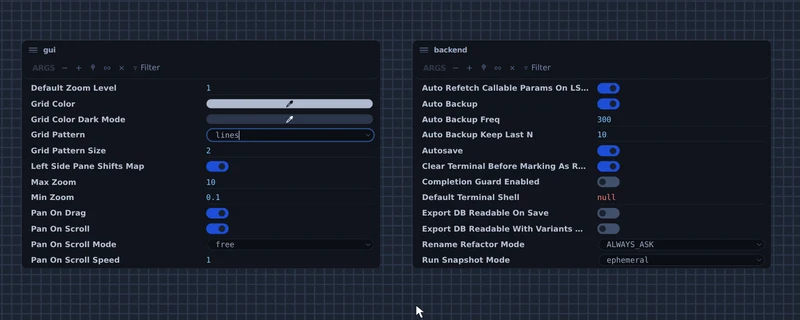
Setta was built to edit configuration through controls. Its own preferences were also configuration, living in a JSON file.
The obvious approach
Reusing the project editor for settings is appealing. If settings were saved like any other project, they would land in the database as a project instead of updating the file the app reads at startup.
What Setta did
In September 2024 the settings became a Setta project whose JSON section pointed at setta-settings.json. The same interface that configured any program could edit the app's own configuration. In October its save path split from ordinary projects: saving wrote the JSON source and reloaded the settings, rather than storing another project.
Projects lived in a local database. Undo and autosave protect against small mistakes, but not against a damaged or lost database.
The obvious approach
Restoring by copying a backup over the current project would destroy whatever was there. If the current project were itself saved as an ordinary backup, normal pruning could later delete it too.
What Setta did
September 2024 added periodic database backups with configurable frequency and retention. From February 2026 backups were on by default, every five minutes with ten kept. The CLI could list backups and restore the latest, one by index or one by path. Before replacing anything it stashed the existing project under a different filename prefix that pruning ignored, and it checked that no workspace was running.
How does a running program know which slider you moved?
What was hard
A live program keeps a model loaded and responds as controls change. Sliders can send many updates per second, and a slow callback may still be running when the next value arrives.
The obvious approach
Rerunning the whole script on every change reloads the model each time. Calling a callback on every event floods it with work that is already out of date.
What Setta did
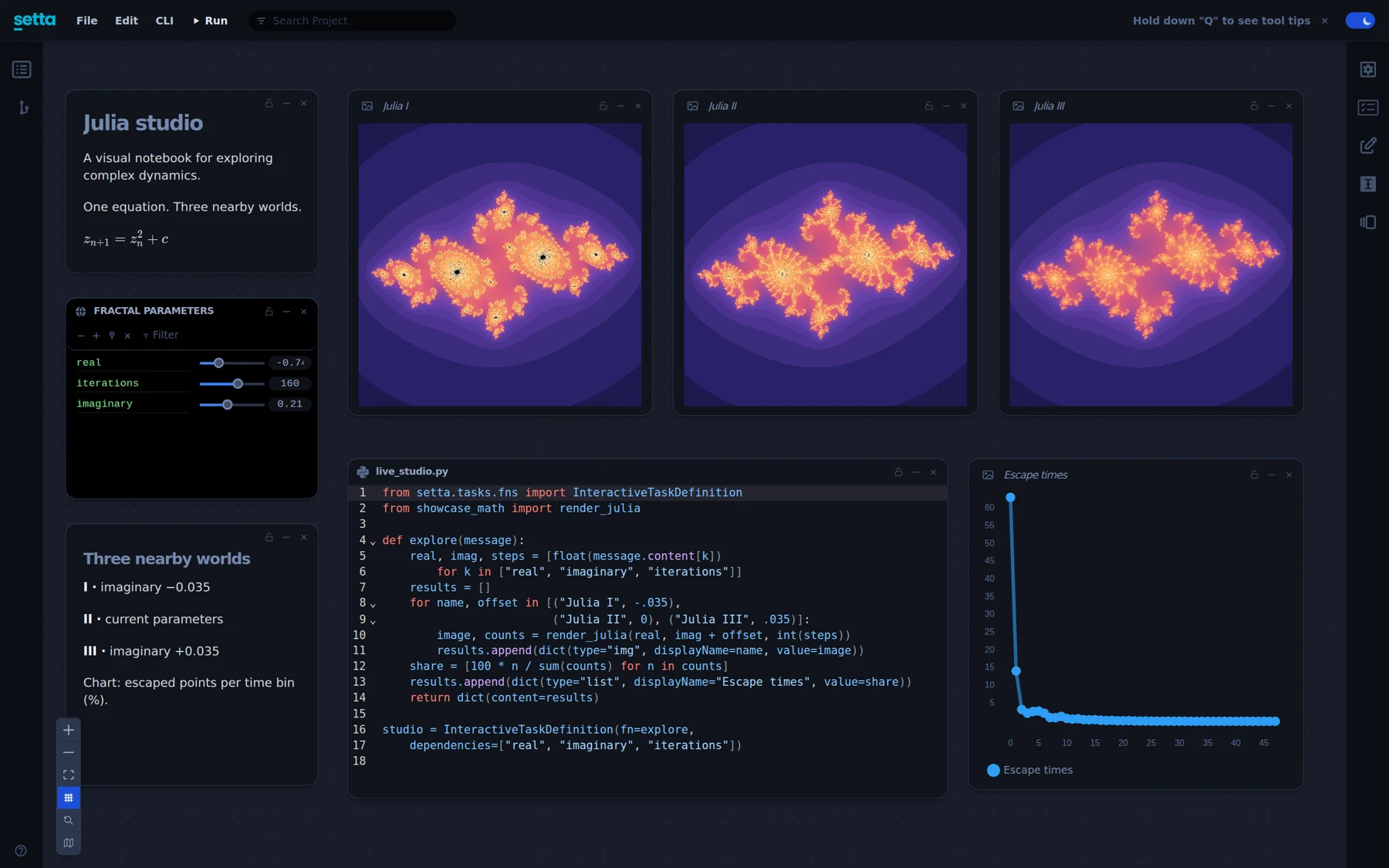
Callbacks subscribed to their inputs through SettaListener, which used asyncio and WebSockets to deliver changes and send back images, charts or text. Each callback could debounce or throttle, with leading or trailing edges. Scheduling accounted for callbacks already running and dropped pending work made obsolete by newer input.
Can you edit the code while it runs and keep the model loaded?
What was hard
Loading a model is slow. Changing how a slider turns into an output is fast. We wanted to edit the second without paying for the first.
The obvious approach
Restarting the program after each save would drop the connection and load the expensive model again every time. A typo in the edit would also take the running program down.
What Setta did
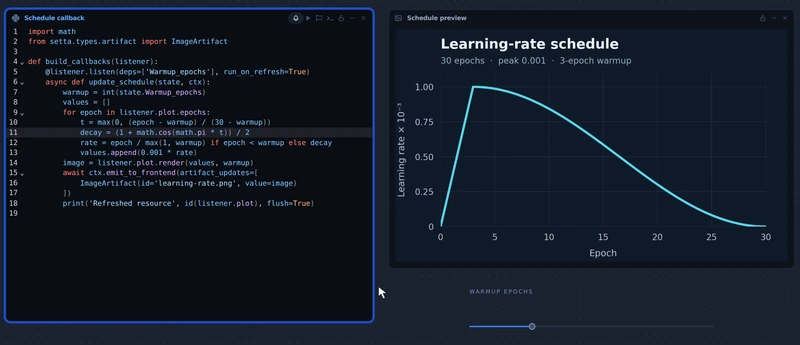
Setta separated resource construction from a named callback-builder function so it could hot-reload the callbacks. watchfiles noticed the edit, the callbacks were rebuilt under a lock, the WebSocket session stayed open and the latest project snapshot was replayed. If the rebuild failed, the previous callbacks were restored. The reload re-ran the whole module, so a model created at its top level was loaded again; it survived only when it lived in another module or a cache that the reload did not re-run.
Later: Watch Code is a different feature: it discovers Python definitions and shows them as cards. Seeing a card appear does not mean a running callback was reloaded.
How do you send a drawing to a live Python program while you are still drawing?
What was hard
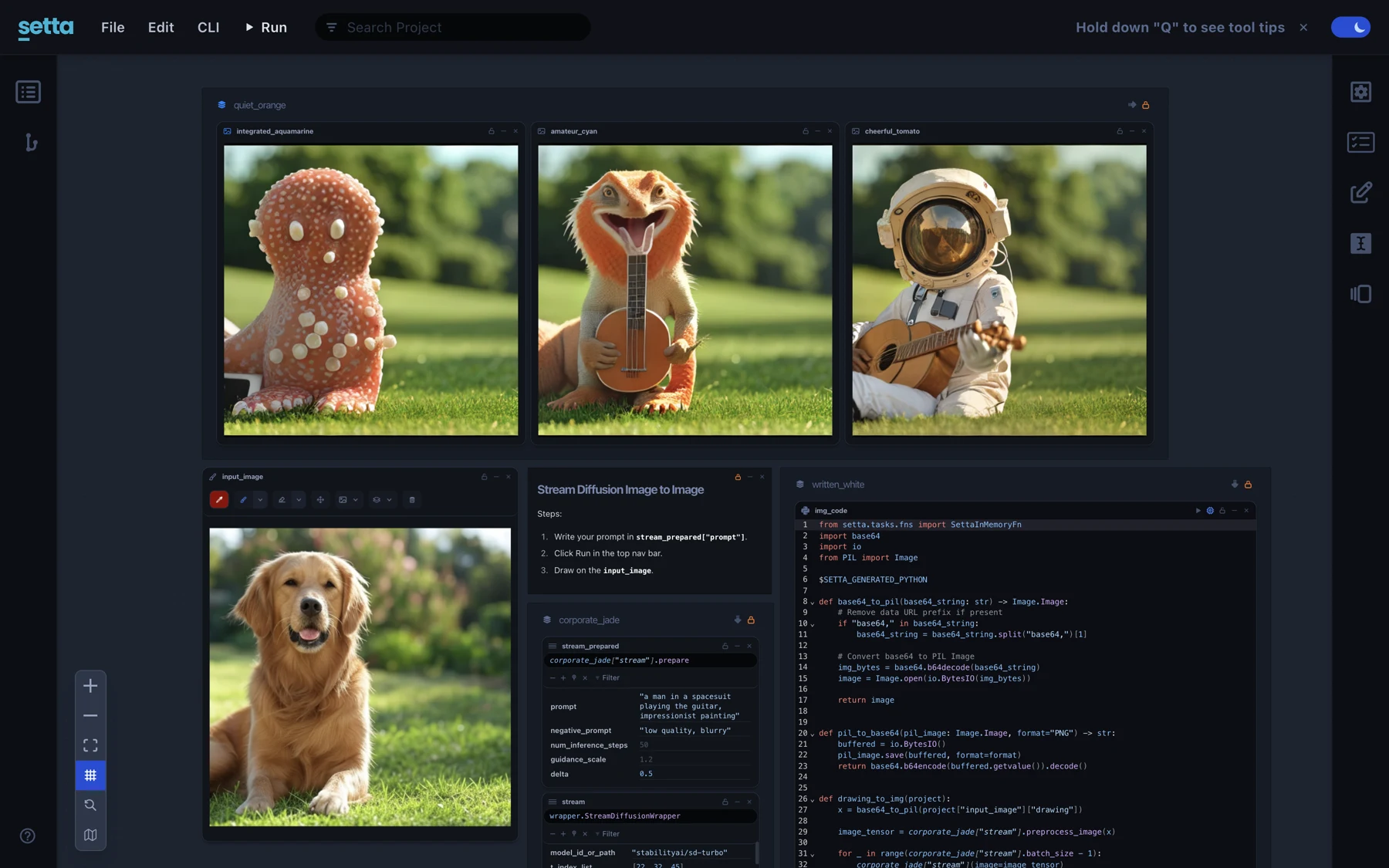
Image programs like StreamDiffusion took a drawing as input. The drawing had layers, strokes and placed images, sat inside a zoomable workspace, and had to reach Python often without stalling the page.
The obvious approach
Painting everything onto one bitmap is simple, but then layers, opacity and moved images cannot be edited again. Sending the full image on every stroke would also swamp the connection.
What Setta did
The Draw section used a custom Canvas 2D implementation with a canvas per layer, plus separate draft and temporary surfaces. It stored paths, layer order, visibility, opacity and image transforms so everything could be redrawn. Pointer positions went through inverse transforms for both workspace zoom and each image's own position and scale. Layer compositing combined the canvases into one image; both that image and individual layers could be sent as PNG data, with throttling and a transfer queue.
Later: The later Realtime application used Fabric.js instead, and the library has smaller drawing primitives.
Assistants arrived through the MCP and Anthropic SDKs, and data contracts became generated rather than hand-maintained. From March 2026 a Go server gradually took over server work, while Python stayed responsible for the programs' own computations and plugins. A separate hosted companion explored identity and deployment, alongside the local workbench.
Interface
richer editors, Glide Data Grid and SheetJS spreadsheets, agent and workflow views
Server
Go with chi and Huma, WebSocket and PTY packages, Tree-sitter for Python syntax
Assistants
MCP and Anthropic SDKs in Python; OpenAI, Anthropic, Google GenAI and MCP SDKs declared in Go; bm25s tool search; Gonja prompt templates
Python runtime
user computation and plugins, kept separate from the Go server
Storage
hosted companion with FastAPI, SQLAlchemy and PostgreSQL, React and Clerk, aimed at Fly.io Machines
2025–2026
How do Python, TypeScript and Go agree on what a project looks like?
This puzzle has a hands-on demo that needs JavaScript.
What was hard
Project state and settings crossed between a Python backend and a TypeScript frontend, and later a Go server. Each side needed the same shapes, defaults and enums.
The obvious approach
Writing the types twice by hand works until one side changes. Translating field names mechanically also loses defaults and tagged unions, which need to know which field picks the variant.
What Setta did
From May 2025 Pydantic models defined project state, with schema-driven code generation producing Zod schemas, TypeScript types and creation functions from those definitions. Endpoint generation read FastAPI routes and Python signatures to emit typed frontend calls, leaving out server-injected arguments and using Zod's input types so defaulted fields stayed optional. After the 2026 Go migration, Go types and metadata fed a shared schema, a semantic sidecar and OpenAPI, with TypeScript and Python derived from that.
Later: Some surfaces still used explicit Go-owned inventories, so discovery was not fully automatic. Setta 3 had its own endpoint registry and generator.
How can an assistant outside Setta find and change a setting?
What was hard
We wanted external coding assistants to operate the workspace, not just chat about it. Settings were spread across panes and tabs that a model could not see.
The obvious approach
Writing directly to the settings file bypasses the application’s validation and leaves you to find the changed control yourself.
What Setta did
The December 2025 MCP bridge was a transport adapter: it relayed an external client's stdio tool calls to the running backend's SSE endpoint and kept project context between calls. The CLI exposed tool schemas with setta tools and JSON calls with setta api. In February 2026 a settings registry added typed IDs, schemas, mutability and UI location. Tools could search, read, validate a write or reveal a setting, and the frontend opened the right pane, scrolled to it and highlighted it briefly.
Later: Revealing a setting is separate from Follow AI, which moves the view between sections on the canvas.
Why do three lines that look the same mean three different things?
This puzzle has a hands-on demo that needs JavaScript.
What was hard
The workbench drew connections for Python values, for what an assistant could read or write, and for workflow steps. All of them were lines between sections.
The obvious approach
One shared edge model would be simpler to draw. It would also let a value dependency trigger execution, or let a workflow link grant an assistant write access, by accident.
What Setta did
The lines represented data dependencies, access permissions or control flow. Python edges described value dependencies and drove code generation. Reactive updates, as in this demo, required a running SettaListener callback; a dependency line alone did not launch Python. Agent edges described readable or writable context for a conversation. Workflow edges dispatched work after completion, failure or a signal, with AND, OR and XOR gates, activation counts, limits and validation of drafts versus runnable graphs. Tool search used bm25s over MCP tool descriptions, and Gonja rendered prompt templates in the Go workbench.
Why does a drop target flicker back and forth while you hover over it?
This puzzle has a hands-on demo that needs JavaScript.
What was hard
While you drag, a placeholder opens a gap where the item would land. That placeholder moves the very target the pointer is being measured against. The target under the pointer is also not always the parent or child that should receive the drop.
The obvious approach
Deciding before or after by comparing the pointer with the target's midpoint on every move looks simple. A tiny movement crosses the midpoint, the placeholder shifts the target, the midpoint moves, and the insertion side keeps swapping.
What Setta did
Setta uses hysteresis: it remembers which side the pointer last crossed and keeps a small reversal band around the saved midpoint. With a midpoint at y = 200 and a 10 pixel band, the side only flips to after below 210 and back to before above 190. January 2026 code tied this memory to the resolved drop target. An August 2026 fix kept a separate rectangle and crossing state for each target, so briefly passing over a parent no longer erased the child's memory and made it jump when selected again.
Later: This applies to moving items between parents; sorting within one parent uses direction-aware dragged edges.
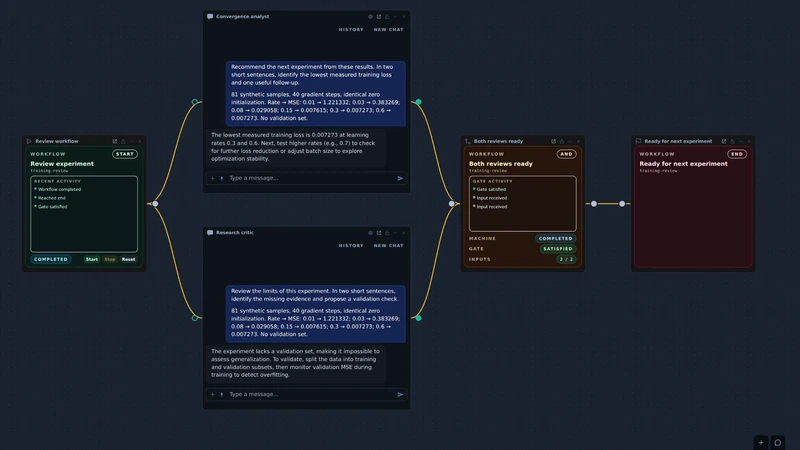
How does a drawing of boxes and arrows become something that runs?
What was hard
Chat sections could be wired together into a workflow, for example two reviewers whose answers feed a next step. Graphs are often half-built while they are still being edited.
The obvious approach
Running whatever is connected as soon as an edge appears would start broken workflows. Guessing that a step finished by reading chat text would trigger the next step at the wrong time.
What Setta did
In March 2026 the workbench added explicit state machines, drawn with Start, Gate, End and Chat sections. Machine groups identified a workflow independently of screen position. An incomplete graph stayed editable, but running required a valid start and end. Edges fired on completion, failure or a structured signal reported by an active child run. AND, OR and XOR gates tracked progress, and activation conditions and limits bounded each run.
Later: Setta 3's workflow editor and durable Go and SQLite engine were a separate implementation.
The workbench server had grown to handle APIs, live connections, terminals, syntax analysis and several AI providers. The programs Setta ran were still Python.
The obvious approach
Rewriting the server in Go could seem to mean moving everything to Go. Those programs' models and computations depend on the Python ecosystem and would not come along.
What Setta did
The Go migration started in March 2026. By May the Go server used chi and Huma for HTTP and APIs, WebSocket and PTY packages for live connections and processes, and Tree-sitter for Python syntax. It declared the OpenAI, Anthropic, Google GenAI and MCP Go SDKs. Python execution and plugins stayed separate responsibilities.
Later: The unused Go backend was removed from the repository in November 2026.
A canvas full of live HTML panels is expensive to repaint while panning and zooming. Each panel still has real editors and controls that you type into.
The obvious approach
Painting the panels as GPU textures cuts repaint work. The pixels then have to stay in sync with click targets, clipping, overlays and focused editors, or a click lands on something that is not where it looks.
What Setta did
WebGPU/GPUFlow started from experimental Chromium HTML-in-canvas APIs. Its later design used texture caching: unchanged HTML and parameter pages stayed in GPU textures as the camera moved, while browser-owned editors remained DOM islands. CanvasFlow was a separate WebGL approach that uploaded only changed visible nodes, reused textures during pan and zoom, evicted them against a memory budget and fell back to Canvas 2D.
Later: Both stayed experiments. A CanvasFlow check saw no extra uploads while panning, but still found incomplete box selection and an edge-drawing problem. It did not establish a general speed-up. The library uses upstream xyflow.
Setta 3 and Setta 4 were new desktop applications that explored other ways to organize agent work. They shared a Go, React and Electron base but chose their own graph renderers and interfaces. Neither one became the source of the later library.
Interface
React, Electron and electron-vite, Tailwind, Zustand; Setta 3 used PixiJS, pixi-viewport, react-virtuoso and highlight.js
Interface
Setta 4 drew its Director graph with a custom WebGL2 renderer and GLSL shaders; artifacts used Base UI, OpenUI and Recharts
Server
Go with agent-process integrations
Storage
SQLite through modernc.org/sqlite, including Setta 3's durable workflow store
Summer 2026
How do you tell a record of agent work apart from proof that it worked?
What was hard
Setta 3 and Setta 4 stored workflows, runs and reports so agent work could be reviewed later. A neat graph or report can look like evidence that something actually ran.
The obvious approach
Storing a drawn workflow and its results in the same shape would blur the line between what was planned, what ran and what a model said about it.
What Setta did
Setta 3's Go and SQLite workflow store kept definition versions, execution transitions and events separately, with explicit persistence and corruption errors. Setta 4's graph kept runtime facts, declarations and model-attributed interpretations as different kinds of record.
Later: The retrospective's authored graphs and replay screens show the interfaces, not successful live orchestration. The library came from the Setta 2 line, not these experiments.
The reusable workspace was extracted from the Setta 2 workbench and published as a React package. It first carried a forked canvas, then switched to upstream xyflow 12 on August 30. Python and the example applications were removed in October and the unused Go backend in November, so each consumer now brings its own backend.
Vite library build; Tailwind and PostCSS compile one scoped stylesheet; CodeMirror and React Icons are bundled
Python runtime
none in the package; a browser pipeline runs host-supplied stages in Web Workers
Server
none; consumers such as Realtime or Python Canvas own their own backends
Aug–Nov 2026
What do you keep when you turn an app into a library?
What was hard
Years of the workbench had tied the workspace to a Python runtime, a Go server and AI providers. Reusing the workspace in other applications meant leaving all of that behind.
The obvious approach
Publishing the whole application as a package would make every consumer carry servers and runtimes they do not use.
What Setta did
The library was extracted from the Setta 2 workbench. It first carried a forked canvas, then switched to upstream xyflow 12 on August 30. The package is TypeScript and React with dnd-kit, Zustand, selected Radix controls, CodeMirror and one scoped stylesheet built by Vite with Tailwind and PostCSS. A browser pipeline runs host-supplied stages in Web Workers, and each consumer brings its own backend.
Later: Python and the example applications were removed in October 2026, and the unused Go backend in November.
What if you move the slider faster than the computer can keep up?
This puzzle has a hands-on demo that needs JavaScript.
What was hard
In Realtime and the library's browser pipeline, inputs can change faster than a computation finishes. Dragging continues while the previous result is still being worked out.
The obvious approach
Queueing every request and showing results as they arrive means the screen keeps replaying old positions. A slow, old result can also arrive after a newer one and overwrite it.
What Setta did
The browser client uses request coalescing: start work immediately, keep one request active and replace any waiting input with the newest one. Revision checks discard stale progress and results, while the last successful output stays on screen. Cancellation or timeout ends the worker. This does not wait for a quiet period as a trailing debounce would. Realtime's separate Go scheduler coordinated Python workers with bounded concurrency, latest-input work and joins that matched results from the same input.
Later: The browser executor rejects dependency cycles and uses memoization so each shared stage runs once per request. Independent asynchronous branches can progress together, but a single Web Worker is not a CPU thread pool.
The code generator turned controls into Python programs. Early versions emitted executable scripts; later templates embedded generated code in authored programs. A generated class replaced those templates in 2025, and a Go renderer followed by May 2026. These stages follow small projects through that evolution.
2020–2024
Read the signature, not the object
This stage has a hands-on demo that needs JavaScript.
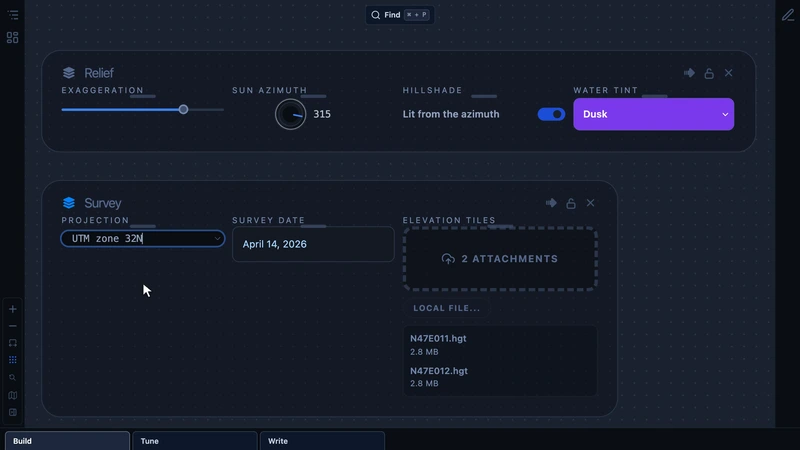
A training setup holds a model, an optimizer and a dataset, each with its own constructor. Building them just to learn their arguments would load weights and data before anything was chosen. In 2020 Setta used introspection through Python's inspect module: a ClassInfo record kept each argument's default, annotation and control type, and React drew the form from it. By June 2024, callable sections requested signatures through a language server to populate their parameter controls. Working basedpyright integration followed in July.
This stage has a hands-on demo that needs JavaScript.
By 2024, template substitution let you embed generated Python in authored code. The later $SETTA_GENERATED_PYTHON placeholder marked the insertion point, with generated lines indented to match it. Other placeholders pointed at sections: $Model$version became "Model@baseline", $data$file_path became the path of that section's file, and $data$import_path let one block import another. Imports could be inferred from dotted names, so torch.nn.Linear added import torch.nn.
This stage has a hands-on demo that needs JavaScript.
In 2025 the generator moved from templates to a generated class. Every section and parameter became a node keyed by its section and parameter IDs, and each got its own attribute named by its path: the x parameter of result became s.result__x. For acyclic graphs, a depth-first walk produced a topological order: dependencies before the values using them, regardless of canvas order. Empty and unnamed parameters were left out.
This stage has a hands-on demo that needs JavaScript.
A control's value arrived as the text typed into it, so the generator had to decide what that text was. By 2026 a policy set it per type and per section. A parameter could be written as an expression, a quoted string or parsed JSON. A drawing or image could arrive as its file path or its file's contents, and fell back to None when no file had been saved. Pairs a type did not support, such as reading a slider from a file, were rejected.
This stage has a hands-on demo that needs JavaScript.
A value could be any Python expression, so the generator scanned it for s.name, later state.name, and turned each match into a dependency. Lexical scope determined which names belonged to the workspace: in [state.lr for state in runs], state is the loop variable, not the workspace. The 2025 scan used Python's ast module and missed lambdas; the Go version of 2026 used tree-sitter with a full scope stack. The stored match positions also powered renaming: rename a section and each reference was rewritten in place.
Put the type checker's errors back on the controls
This stage has a hands-on demo that needs JavaScript.
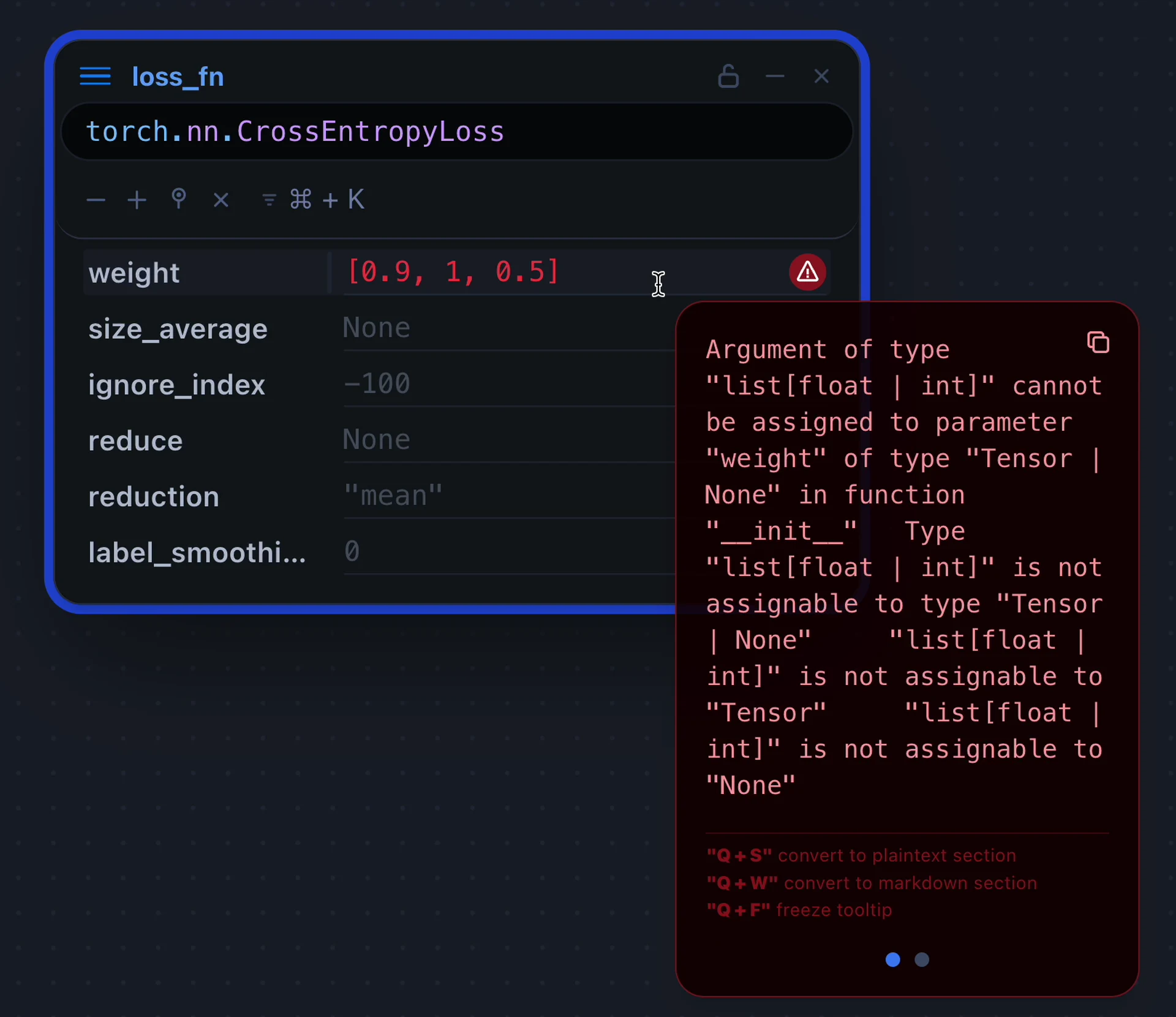
By July 2024, the template generator could map supported type errors back to parameter controls using variable positions and control IDs. The 2025 class generator carried that link forward, recording each value's starting offset in setta_gen.py and the section and parameter it came from. A wrong argument type was matched by the variable the language server named; a missing argument by the call's offset. The message appeared on the control, and the same offsets positioned autocomplete inside it.
Scope: This was a table of value offsets for diagnostics and completion, not a general source map.
This stage has a hands-on demo that needs JavaScript.
Nothing on the canvas stopped a cycle: a could read b while b read a. The template generator refused with "Circular reference detected". The 2025 class generator found the cycle, printed a warning and wrote every line anyway, so the file used an attribute before assigning it. The Go renderer of 2026 skipped the repeated node without a warning.
Later: The library's browser executor, a separate later design, rejects cycles.
This stage has a hands-on demo that needs JavaScript.
By 2026 the generated file had three parts. Your prefix came first, with imports and setup. Then the SettaState class, which the editor showed but kept read-only. Then your suffix, by default state = SettaState(), the line that actually created state. With metadata turned on, a block after the suffix attached state.__state__, so code could ask which project, section and variant a value came from.